Best email broadcast tools for agencies re-engaging a client's lapsed audience
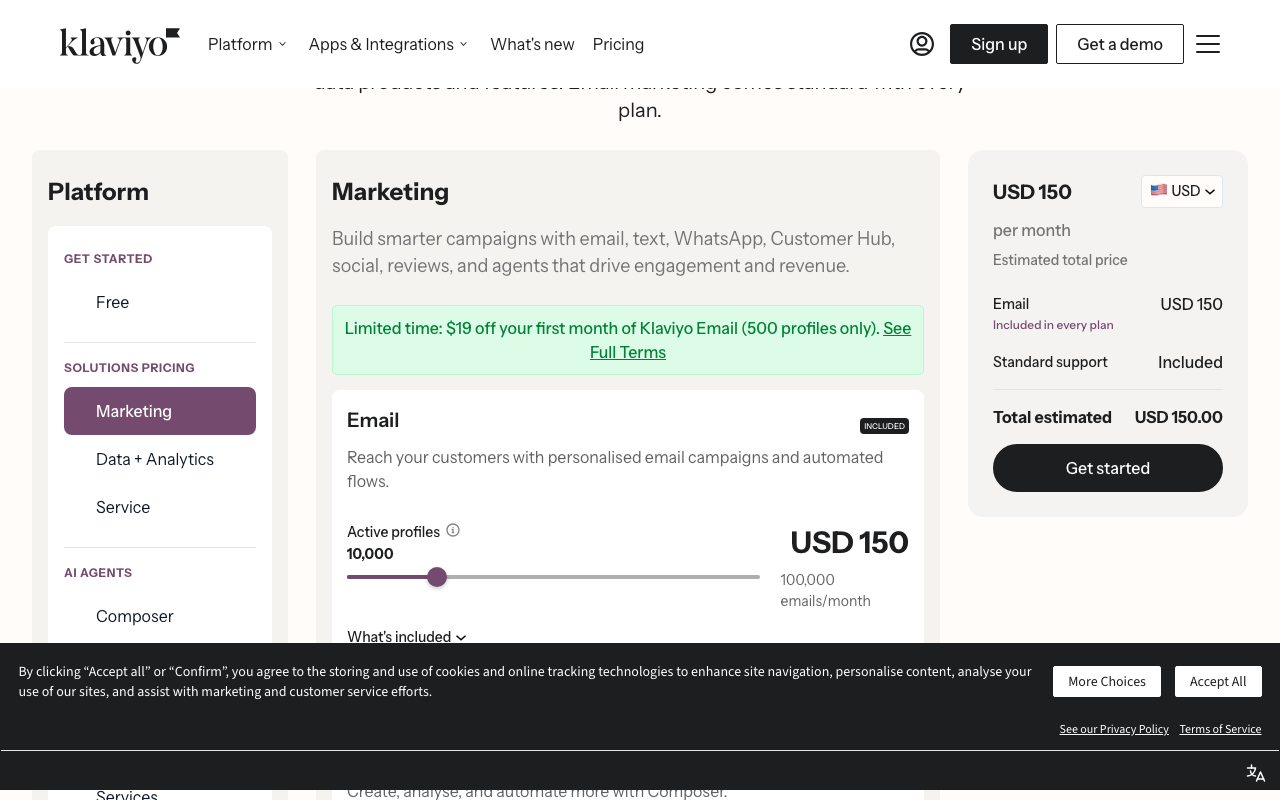
Pick the tool by what your clients sell. Choose Klaviyo when most clients are online shops: its pricing page prices by active profiles, from $30 for 1,000 profiles to $150 for 10,000, so list size rather than send volume sets the bill. Choose ActiveCampaign when the clients are service businesses that need conditional branches, and Brevo when the dormant list is big and the budget is small, because its free plan stores up to 100,000 contacts. Whichever you buy, the order of the work matters more than the tool: confirm permission, reconfirm in slices, suppress the silent, then report.
Why a lapsed list is a risk you hold for someone else
When an agency wakes a dormant list, the first message goes to the people most likely to hit "report spam", and the sending domain that absorbs the damage belongs to the client, not to you. Google's sender guidelines say that user spam reports can lower a domain's reputation over time, and that a domain reported frequently as spam sees future messages more likely to land in spam. If you run this for three clients, you have three separate reputations to protect, and a careless blast for one of them will not hurt the other two only if you kept their domains and accounts apart.
That separation is the first agency-specific rule. Each client needs its own sending domain with its own SPF, DKIM and DMARC. Google says to set up authentication for each of your sending domains, and Yahoo's bulk-sender list asks for a DMARC policy of at least p=none with the From domain aligned to the SPF or DKIM domain. If you mail "from" a client's address through your own agency domain, Google's own wording applies: do not impersonate other domains or senders without permission. Get DNS access in writing before the project starts, or ask the client's IT contact to publish the records you send them.
The sunset-and-win-back sequence, in order
- Establish where every address came from. Ask for the source of each import: signup form, checkout box, event scan, a purchased file. Google says not to send to people who did not sign up and not to buy addresses; Yahoo asks senders to verify that they mail only users who specifically requested it. Addresses with no explanation go to suppression, never into a win-back.
- Write the definition of "lapsed" for each client. Use last click, last purchase, last login or last reply. Do not lean on opens alone: Google states that it does not track open rates, cannot verify the open rates third parties report, and that low open rates are not necessarily an accurate sign of deliverability or spam problems. A shop that mails weekly and a firm that mails every quarter cannot share one window, and this page deliberately gives no day count because the right one depends on that client's cadence. Put the number in the statement of work.
- Split the lapsed segment three ways. Hard bounces and errored addresses leave immediately; Yahoo's advice is to remove invalid recipients promptly and to watch hard and soft bounces. The quiet but deliverable group goes to the reconfirmation track. Anyone who has unsubscribed or complained is excluded by the tool's suppression list, not by a spreadsheet filter someone forgets next month.
- Send the reconfirmation in slices. Google recommends periodically sending messages that confirm recipients want to stay subscribed, and Yahoo suggests a reconfirmation email to inactive subscribers. Google also tells senders to begin with low volume to engaged users and to avoid sudden spikes. A lapsed list is the least engaged mail the domain will send, so release it over several days and widen only while the complaint rate stays low. One clear question, the client's name in the From line, and one link that says "yes, keep me".
- Send one reminder, then stop. Google's guidance includes considering unsubscribing recipients who do not open or read messages. Whoever ignores the reconfirmation and the single reminder is moved to suppressed status with a reason and a date.
- Keep the suppression record and report. The suppressed addresses stay in the account as suppressed, because deleting them lets the client's next CSV upload re-add them. The per-client report lists reconfirmed, removed, bounced and complained, and nothing about "revenue recovered" unless the client's own store data says so.
What the receivers publish about complaints
| Rule | Google (Gmail sender guidelines) | Yahoo (Sender Hub) |
|---|---|---|
| Spam rate | Keep it below 0.10% in Postmaster Tools and avoid ever reaching 0.30% | Keep it below 0.3%, calculated on mail delivered to the inbox |
| Inactive people | Consider unsubscribing recipients who do not open or read | Monitor inactive recipients; consider a reconfirmation email |
| Unsubscribe speed | One-click is required for marketing mail above 5,000 messages a day | Honor unsubscribes within 2 days |
| Where to read it | Email sender guidelines | Sender requirements and recommendations |
Postmaster Tools is registered per domain, so an agency with three clients registers three domains and checks three dashboards. Put that review in the monthly report rather than doing it only when a client calls about the inbox.
Agency problems that only appear in re-engagement
- Approval of the cut. A sunset rule removes people from the client's list. The client signs the definition of "lapsed" and the exclusion rule, not just the email copy.
- Who holds the list at the end. The contract should say the client owns the audience and the suppression data and that you will export both on request. A suppression list that only exists inside your agency account walks out the door with you.
- Seats. Brevo's pricing help page lists $9 per month for each additional marketing seat. ActiveCampaign's pricing page shows Starter with 1 user and Pro with 3, so a client-facing reviewer can force a plan upgrade.
- One account or three. Separate accounts keep reputations, billing and suppression apart, at the price of three logins and three invoices. A shared account is cheaper to run, but one client's complaint spike then sits in the same dashboard as the others.
Six tools that suit this job
1. Klaviyo: for retail clients with purchase history
Klaviyo's email plan steps by active profiles: 500 profiles cost $20, 1,000 cost $30, 2,500 cost $60, 5,000 cost $100, 10,000 cost $150 and 25,000 cost $400. The free plan covers 250 active profiles and 500 sends a month. For re-engagement the reason to shortlist it is pricing built around stores, where the cuts you need are "no purchase" and "no click"; build both in a trial account before you quote a client. The cost is that it prices by profile, so a client with a huge dormant list pays for it until it is cleaned. See Klaviyo alternatives if a client outgrows the tiers.
2. Drip: for stores that want a workflow builder and a stepped price
Drip's pricing page says cost depends on the number of active people and the volume of emails sent. Slider readouts: $39 for 1 to 2,500 people, $89 at 5,000, $154 at 10,000, $369 at 25,000. Its plans list unlimited email sends, dynamic segments and up to 50 workflows, and there is a 14-day trial with no card, but no ongoing free plan. It suits a shop client where you want to build the win-back as a workflow with exit conditions. Compare it in ActiveCampaign vs Drip and Customer.io vs Drip.
3. ActiveCampaign: for service clients with branching follow-up
Starter starts at $15 at 1,000 contacts (billed annually) with 1 user and 5 actions per automation; Plus is $49, Pro $79 and Enterprise $145 at the same starting size. Standard segmentation arrives on Plus and advanced segmentation on Pro, which matters when the cut is "clicked a proposal link but never replied". ActiveCampaign's own cost article puts Starter at $149 a month for 10,000 contacts. Five actions is tight for a reconfirm, reminder, tag and suppress flow with a wait step, so budget for Plus. More in the ActiveCampaign alternatives page.
4. Brevo: for large, rarely mailed dormant lists
Brevo's free plan allows 300 sends a day and storage for up to 100,000 contacts; Starter is $9 and Standard $18, both from 5,000 emails a month, with automation and A/B testing on Standard. The daily cap becomes a pacing tool: a reconfirmation to 3,000 addresses runs 3,000 divided by 300, or 10 days, which is exactly the slow release Google asks for. The cost is the seat charge and the 2,000-contact limit on marketing automation on the free plan. Read Brevo alternatives before committing a client.
5. Omnisend: for stores that add SMS to the win-back
Omnisend's free plan has 250 contacts and 500 emails a month. Standard shows $11.20 at 500 contacts and 6,000 emails, and that is a first-three-month offer rate (the page lists $33.60 today against $48.00 total); Pro lists unlimited monthly emails and shows $41.30 as the same kind of first-three-months offer rate ($123.90 today against $177.00 total), so it is not a price at any particular list size. Its pricing page also states that unsubscribed contacts are not billed, which is a concrete reason for an agency to use it where a sunset removes people by unsubscribing them. SMS is billed separately from $0.007 per message, and an SMS win-back needs its own consent trail.
6. Buttondown: for newsletter clients with a small, loyal audience
Buttondown is free for the first 100 subscribers and says it charges for active subscribers, meaning the people actually receiving the emails. Tagging and segmentation is a +$9 per month add-on, Automations +$29, Multiple newsletters +$29 and Whitelabeling +$79, each per its pricing page. It is a fit when a client's list is an editorial one and the win-back is a personal note rather than a funnel. See Buttondown alternatives.
Cost for three clients, and what a clean-up changes
Suppose a shop with 2,500 profiles, a second with 5,000 and a third with 10,000. Each gets its own account, so the invoices are separate.
| Plan | 2,500 | 5,000 | 10,000 | Three accounts, per month |
|---|---|---|---|---|
| Klaviyo email plan | $60 | $100 | $150 | $60 + $100 + $150 = $310 |
| Drip | $39 | $89 | $154 | $39 + $89 + $154 = $282 |
Twelve months is $3,720 on Klaviyo (310 x 12) and $3,384 on Drip (282 x 12), a gap of $336 a year. Now the sunset removes the silent half of the 10,000-person client, leaving 5,000. On Klaviyo that account moves from $150 to $100, saving $50 a month or $600 a year; on Drip it moves from $154 to $89, saving $65 a month or $780 a year. Those savings only happen if the platform stops counting the removed addresses, so read the vendor's help article on suppressed or unsubscribed profiles before you promise the client a lower invoice. The honest pitch to the client is a cleaner reputation first and a cheaper bill second.
Which to choose
| Your client | Start with | Reason |
|---|---|---|
| Online shop, purchase data in the platform | Klaviyo or Drip | Segments built on orders; per-profile pricing you can project |
| Consultancy or B2B with a CRM | ActiveCampaign Plus or Pro | Conditional steps and tags; 5-action cap on Starter |
| Large list, mailed rarely, tight budget | Brevo | Free plan stores 100,000 contacts; 300 sends a day paces the slices |
| Store adding SMS | Omnisend | Unsubscribed contacts are not billed; SMS needs separate consent |
| Editorial newsletter | Buttondown | Bills active subscribers; a personal reconfirmation fits |
Pitfalls
- Treating a missing open as proof of a lapsed subscriber. Google says it cannot verify the open rates that third parties report and that low open rates are not necessarily an accurate deliverability signal. Use clicks, orders and replies.
- Sending the reconfirmation to everyone at once. That is the sudden spike Google warns about, aimed at the audience least likely to welcome it.
- Offering a discount to the lapsed segment before asking whether they want the emails. Someone who takes a coupon and then complains does more harm than someone who quietly leaves.
- Letting the client re-import the old CSV. Keep the suppression list as a first-class asset and tell the client's marketing team where it lives.
- Reporting only the win-back rate. A client who reads "40 people came back" without "800 were removed" will ask why the list shrank.
For the delivery background behind these steps, read the email deliverability guide and the email broadcast guide; for smaller agencies picking one tool for everything, best email broadcast tools for small teams covers the wider field.
FAQ
How long should a subscriber be quiet before an agency calls them lapsed?
There is no number in Google's or Yahoo's published guidance, so use the client's own cadence and record the choice in writing. A weekly sender and a quarterly sender need different windows. Base it on clicks, purchases, logins or replies rather than opens.
Should we delete lapsed subscribers or suppress them?
Suppress them, with a reason and a date. A deleted address can be re-imported from an old file without anyone noticing, while a suppressed one stays blocked. Hard bounces can go, since Yahoo recommends removing invalid recipients promptly.
Can one agency account serve every client's re-engagement campaign?
It can, but the clients then share a dashboard and, depending on the tool, billing and seats. Separate accounts keep each client's reputation, suppression list and invoice apart and make the hand-over at contract end simple. The cost is more logins, which is why seat prices such as Brevo's $9 per extra marketing seat matter.
Does a win-back sequence need double opt-in?
For existing subscribers the relevant step is reconfirmation, which Google and Yahoo both describe, not a fresh double opt-in. Use confirmed opt-in for new signups going forward, since Yahoo recommends it to keep invalid and fake addresses off the list.