Klaviyo alternatives for broadcast email: what the same list costs elsewhere
Klaviyo costs $150 at 10,000 profiles and $400 at 25,000. Eight alternatives priced at 5,000 and 10,000 contacts, plus what you lose by leaving.
Short answer
Klaviyo's email plan is priced by active profiles: $100 at 5,000, $150 at 10,000 and $400 at 25,000. If most of what you send is campaigns to a list, my pick is MailerLite. Its Comfort plan is $89 at 10,000 subscribers, which is $61 a month ($732 a year) under Klaviyo, and its send allowance at that size, ten times the subscriber ceiling, is 100,000 emails, the same figure Klaviyo shows at 10,000 profiles. If you leave mainly for price but keep store-driven flows, Drip is the nearest peer: $11 a month under Klaviyo at 5,000 people ($89 against $100) but $4 over at 10,000 ($154 against $150). Kit is the pick if broadcasts alone are enough: it is free up to 10,000 subscribers.
Why people leave Klaviyo
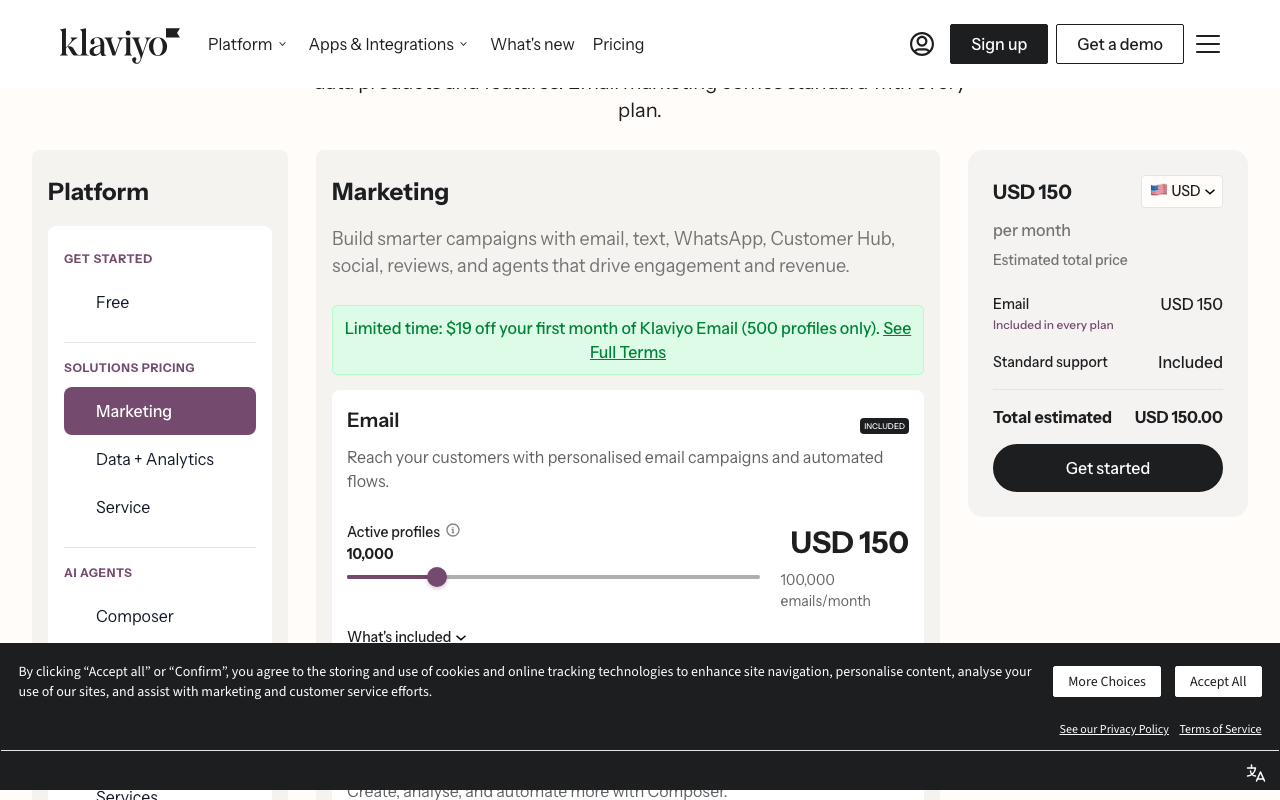
The trigger is almost always the bill that arrives when a list crosses a pricing step. Klaviyo's pricing page has a profile slider for the email plan, and I read it on 7 October 2026. The free plan covers 250 profiles and 500 sends a month, so a shop with 300 subscribers is already on the $20 step. The paid steps I recorded are below.
| Active profiles | Monthly price | Emails a month listed | Price per 1,000 profiles |
|---|---|---|---|
| 500 | $20 | 5,000 | $40.00 |
| 1,000 | $30 | 10,000 | $30.00 |
| 2,500 | $60 | 25,000 | $24.00 |
| 5,000 | $100 | 50,000 | $20.00 |
| 10,000 | $150 | 100,000 | $15.00 |
| 25,000 | $400 | 250,000 | $16.00 |
Read the last two rows together. Moving from 5,000 to 10,000 profiles adds $50 for 5,000 more people, which is $10 per extra 1,000. Moving from 10,000 to 25,000 adds $250 for 15,000 more people, which is $16.67 per extra 1,000, and the cheapest rate per profile on the whole ladder, $15 per 1,000, sits at the 10,000 step. I recorded no stop between 10,000 and 25,000, so I cannot tell you where inside that range the price climbs, only that the next number on the page is $400. Over a year that is 12 x $150 = $1,800 at 10,000 profiles against 12 x $400 = $4,800 at 25,000. My capture has no readout past 25,000 and none for the Email plus SMS selector, so this page prices email only. The free plan's separate $5 of mobile messages a month is on Klaviyo's page, but I did not record what SMS costs beyond it.
Because the allowance is ten times the profile count at every step, the unit you pay for is list size, not volume. A store with 10,000 profiles that mails each of them four times a month sends 40,000 emails, 40% of the 100,000 it is allowed. That mismatch is where cheaper per-send or per-contact tools win: you stop paying for headroom you are not using.
What you give up by leaving
Klaviyo's pricing page describes its email product as personalised email campaigns and automated flows, and its Marketing section pitches email, text, WhatsApp, reviews and agents "that drive engagement and revenue". The page ties email to customer data and revenue, and that is the part a cheaper tool has to match. What I can say from each vendor's pricing page: MailerLite lists Shopify, WooCommerce and Stripe integrations, Drip lists Shopify, WooCommerce, BigCommerce and Stripe and names ecommerce revenue attribution as a feature, and Mailchimp lists Shopify and WooCommerce. I did not capture an integration list for Omnisend, Kit, Customer.io or Resend, and a name on a list does not show which order and product fields reach the tool. Settle that in a trial before you move, because a cheaper tool that can only send to a flat list turns a revenue channel into a newsletter.
Do the sum with your own numbers. At 10,000 profiles the saving on MailerLite Comfort is $732 a year. If Klaviyo's flows bring in more than that and you cannot rebuild them elsewhere, staying is the rational call. If your sends are campaigns, announcements and a welcome series, you are paying for a data layer you are not using.
Quick comparison
| Alternative | Best if you | Billing unit | 5,000 / 10,000 | Free plan |
|---|---|---|---|---|
| Klaviyo (baseline) | run store-data flows | Active profiles | $100 / $150 | 250 profiles, 500 sends a month |
| MailerLite | mostly send campaigns | Subscribers | $49 / $89 (Comfort) | 250 subscribers, 2,500 emails |
| Mailchimp | want the largest ecosystem | Contacts, in bands | $100 / $135 (Standard) | 250 contacts, 500 sends |
| Drip | keep store-driven workflows | Active people | $89 / $154 | 14-day trial only |
| Omnisend | mix email, SMS and web push | Contacts | Not read at these sizes | 250 contacts, 500 emails |
| Kit | sell content and need broadcasts | Subscribers | $75 / $116 (Creator) | Up to 10,000 subscribers |
| Customer.io | trigger on product or purchase events | Profiles | $100 / $145 | None (startup program) |
| Resend | have a developer on staff | Contacts | $40 / $80 | 1,000 contacts |
| Shopify Email | run a Shopify store | Emails sent | Not computed: first 10,000 emails free, then from $1 per 1,000 | First 10,000 emails a month |
The eight alternatives
1. MailerLite: the lowest list-based price for a campaign-first shop
Choose it when your calendar is campaigns, a welcome series and the occasional win-back, and the profile bill is what hurts. On MailerLite's pricing page Comfort reads $49 at 5,000 subscribers and $89 at 10,000, against Klaviyo's $100 and $150. That is $51 a month ($612 a year) at 5,000 and $61 a month ($732 a year) at 10,000. At 25,000 subscribers Comfort is $179, which is $221 a month ($2,652 a year) under Klaviyo's $400. Power is $69, $129 and $239 at the same sizes; at 10,000 it is still $21 a month ($252 a year) cheaper than Klaviyo and lists unlimited monthly emails. The free plan is smaller than Klaviyo's headline numbers suggest: 250 subscribers, 2,500 emails a month and two seats. The page lists Shopify, WooCommerce and Stripe integrations, but it does not say which order fields they pass on, so test your one most valuable flow, such as a post-purchase series, before you commit. MailerLite also states that its data storage center is in the European Union, which helps if your consent policy names EU storage. Migration is a CSV import with fields mapped by hand, then flows rebuilt from scratch. Our MailerLite vs Mailchimp page covers the neighbouring decision.
2. Mailchimp: the same price at 5,000, a cliff above 10,000
Choose it when your team already knows its editor or a partner tool you rely on plugs into it. Mailchimp's pricing page lists Shopify, WooCommerce, Zapier, Canva and Square among its integrations, and prices Standard in contact bands: $100 for 2,501 to 5,000 contacts, $135 for 5,001 to 10,000, $230 for 10,001 to 15,000 and $310 for 20,001 to 25,000. So at 5,000 it matches Klaviyo's $100, at 10,000 it is $15 under ($180 a year), and at 25,000 it is $90 under ($1,080 a year). The sharp edge is at the band boundary: one contact past 10,000 moves the bill from $135 to $230, a $95 step. The page also shows a first-12-months offer of $50 and $67.50 on the first two bands; at 10,000 contacts that is 12 x $67.50 = $810 in year one against 12 x $150 = $1,800 on Klaviyo, but the $135 list price applies from month 13. Standard lists up to 120,000 emails a month at the 10,000 band and five seats. Free is 250 contacts and 500 sends a month, the same two numbers as Klaviyo's free plan. You lose Klaviyo's profile-level pricing logic and gain contact bands you can plan around. Clean your list below a band boundary before you import.
3. Drip: the nearest peer, so the price barely moves
Choose it when the reason to leave is the support or the editor and you still want an ecommerce CRM, not a lower bill. Drip's pricing page prices by active people: $89 at 5,000, $154 at 10,000, $209 at 15,000, $289 at 20,000 and $369 at 25,000. Against Klaviyo that is $11 a month under at 5,000 ($132 a year), $4 over at 10,000 ($48 a year) and $31 under at 25,000 ($372 a year). The listed tiers include unlimited email sends, dynamic segments and onsite campaigns, with up to 50 workflows at the 5,000 and 10,000 readouts. At the 25,000 tier the page adds free migration and personalised onboarding, which is a rare thing to be offered at the moment you are most likely to switch. There is no ongoing free plan, only a 14-day trial with no card. Migration effort is similar to any like-for-like swap: import people with their tags, rebuild each workflow, run old and new in parallel for a send cycle. If you also run behavioural messages, Customer.io vs Drip sets the two against each other.
4. Omnisend: matches Klaviyo on the free plan, adds web push
Choose it when the store runs email and SMS from one calendar. Omnisend's pricing page has a free plan of 250 contacts, 500 emails and 500 web push notifications a month, so the first two numbers equal Klaviyo's free plan and the push allowance is extra. Standard covers 500 contacts and 6,000 emails a month against Klaviyo's 5,000 emails at 500 profiles. Pro is listed at 2,500 contacts with monthly emails shown as unlimited and SMS from $0.007 each. My capture did not read Omnisend at 5,000 or 10,000 contacts, so I cannot price those steps here. At 2,500 the page shows $41.30 as a 30%-off rate for the first three months ($123.90 today, $177.00 in total). For three months that is $3 under Klaviyo's $60 x 3 = $180, so Omnisend at list is not a money-saver at this size; you choose it for the channel mix. One billing detail matters on migration: the page says you are billed for subscribers and non-subscribers who received automated messages, and that unsubscribed contacts are not billed. Import only people with consent.
5. Kit: free to 10,000 if you can live without sequences
Choose it when you sell content, courses or a membership alongside the shop and your sends are broadcasts. Kit's pricing page lists a free plan up to 10,000 subscribers with email broadcasts, landing pages and forms, tagging and segmentation. Visual Automations and sequences start on Creator, read at $75 at 5,000 subscribers, $116 at 10,000 and $166 at 25,000 (monthly rate shown, billed yearly). Against Klaviyo that is $25 a month under at 5,000 ($300 a year), $34 under at 10,000 ($408 a year) and $234 under at 25,000 ($2,808 a year). If a 10,000-profile list only needs broadcasts, the free plan removes the whole $150 bill: $1,800 a year. The page also offers free migrations and a 14-day trial. What you lose is anything built on purchase data; you gain tagging that follows the reader rather than the order. Expect to rebuild flows as sequences and to move segments over as tags.
6. Customer.io: for stores that trigger on events, with a cleaner ladder
Choose it when your messages follow what a person did, such as a subscription renewal, a failed payment or a feature used, more than what a catalogue holds. Customer.io's pricing page lists Essentials at $100 a month for 5,000 profiles, $145 for 10,000, $235 for 20,000 and $325 for 30,000, with a rate of $0.009 for each extra profile. Against Klaviyo that is level at 5,000 and $5 under at 10,000 ($60 a year); there is no 25,000 readout, so compare 20,000 and 30,000 on their own. Essentials lists one million emails a month and transactional sending in every plan, but its comparison table marks managed deliverability as not included on Essentials. One billing rule is worth knowing before you clean a list: its docs say a profile that exists at any point in the billing period counts for that month even if you delete it, so pruning mid-month does not lower that invoice. Companies that raised under $10M can get twelve months free through its startup program. Its page lists a visual workflow builder, email, push, in-app and WhatsApp messaging; the pricing page I read does not list ecommerce integrations, so confirm your store connection before you plan around it.
7. Resend: the biggest saving, if a developer owns the integration
Choose it when you have an engineer who would rather send from code than maintain a store app. Resend's pricing page has a Marketing tab: free at 1,000 contacts with unlimited broadcast sending, 10,000 automation runs and 3 segments; then $40 at 5,000 contacts, $80 at 10,000, $180 at 25,000 and $250 at 50,000. Against Klaviyo that is $60 a month under at 5,000 ($720 a year), $70 under at 10,000 ($840 a year) and $220 under at 25,000 ($2,640 a year). A 50,000-contact list on Resend costs $250, which is $150 under what Klaviyo charges for half that audience. The same account has a transactional tab, so order confirmations can share a vendor: its Pro is $20 at 50,000 emails. The trade is plain: you build the bridge between your store and your list yourself. See Resend vs Postmark if the transactional side is the harder question.
8. Shopify Email: pay per send, not per profile
Choose it when you run a Shopify store and list size is the problem. Shopify's pricing help page says the first 10,000 emails each month are free and pricing starts at $1 per 1,000 emails after that. I am not computing monthly totals, because the page gives a starting rate, not a confirmed price for every volume above the free allowance. What the wording does tell you is the billing unit: emails sent, not profiles kept. A 10,000-person list mailed once a month fits inside the free 10,000 emails; each further campaign to the whole list adds another 10,000 billable emails. Count your own sends per month before you compare it with Klaviyo's $150. Shopify's help page covers pricing only, so I make no claim about its automation features; check what your store needs, and keep a second tool for automation if Shopify Email does not cover it.
Cost at three list sizes
| Per month | 5,000 | 10,000 | 25,000 | Yearly saving at 10,000 |
|---|---|---|---|---|
| Klaviyo email | $100 | $150 | $400 | baseline: 12 x $150 = $1,800 |
| MailerLite Comfort | $49 | $89 | $179 | 12 x $61 = $732 |
| Mailchimp Standard | $100 | $135 | $310 | 12 x $15 = $180 |
| Drip | $89 | $154 | $369 | $48 more a year |
| Kit Creator | $75 | $116 | $166 | 12 x $34 = $408 |
| Customer.io Essentials | $100 | $145 | not read (20,000 is $235) | 12 x $5 = $60 |
| Resend Marketing | $40 | $80 | $180 | 12 x $70 = $840 |
All figures are monthly list prices read from each vendor's pricing page on 7 October 2026. Mailchimp's first-year discount, Omnisend's three-month offer and SMS charges are left out. Kit's Creator figures are its monthly rate on yearly billing. Shopify Email is left out because it bills per email sent, not per list size, and its page gives only a starting rate above the free 10,000 emails.
Switching from Klaviyo
Export first, and export more than the subscribed list. You want every profile with its opt-in source and date where you hold them, a separate file of unsubscribed, bounced and complaint addresses, and the segment definitions written out as plain rules (for example "bought in the last 90 days, did not open the last five emails"). Segments and flows rarely arrive as working objects in another tool: treat them as specifications you rebuild, and expect templates to need a rebuild too, since the design blocks differ.
Load suppressions before the audience. If the new tool's first send reaches someone who unsubscribed in Klaviyo last spring, that is a consent incident, not a migration quirk. Import the suppressed addresses as unsubscribed, then the consented list. Reset one thing deliberately: addresses with no engagement for a long period should go to a separate re-permission segment rather than the main list, because you are about to pay for each one by contact count, or in Omnisend's case by recipient.
Run a two-week pilot. Pick one campaign and your single highest-earning flow, rebuild them in the new tool, and send the campaign to a slice of 1,000 to 2,000 profiles while the rest still receive it from Klaviyo. Compare delivery and the revenue you can attribute by the same method on both sides; if the new tool cannot show it, decide now whether you will track revenue from your store's own reports. Switch the sending domain's authentication records only when the pilot looks right, and keep the Klaviyo account until the first full billing cycle has closed so you can pull any report you need for a year-on-year comparison.
Which one to pick
- MailerLite if your sends are campaigns and the aim is the lowest list-based bill: $89 at 10,000 against $150.
- Drip if you want to keep store-driven workflows and are happy to pay about what you pay now.
- Kit if you sell content and broadcasts are enough: free to 10,000 subscribers.
- Resend if a developer owns the integration: $80 at 10,000 contacts, $250 at 50,000.
- Shopify Email if you are on Shopify and want the bill to follow emails sent, with the first 10,000 each month free.
- Customer.io if flows should follow events and you can live with $145 at 10,000 profiles.
- Mailchimp if your team or a partner tool already runs on it and you can stay under a band boundary.
- Omnisend if email, SMS and web push share one calendar and price is secondary.
For the wider picture read how to choose an email tool and the email broadcast guide, or browse the other alternatives pages and the tool index.
FAQ
How much does Klaviyo cost at 10,000 profiles?
Klaviyo's pricing page showed $150 a month for 10,000 active profiles on the email plan on 7 October 2026, with 100,000 emails a month listed. The ladder is $100 at 5,000 profiles and $400 at 25,000. The free plan stops at 250 profiles and 500 sends a month.
What is the cheapest Klaviyo alternative for 10,000 contacts?
On list prices, Resend Marketing is lowest at $80, then MailerLite Comfort at $89. Shopify Email bills per email instead (the first 10,000 each month are free), so its cost depends on how often you send. Kit is free to 10,000 subscribers if you can work without sequences. Drip is the one that costs more: $154.
Can I keep Klaviyo's flows when I move?
Not as imported objects. Plan to rebuild each flow in the new tool from a written specification, and rebuild your best-earning one first. Segments should be written as plain rules before you export, so you can recreate them as tags, groups or segments.
Does a cheaper tool hurt deliverability?
Price is not the variable. What changes is your sending domain, your list quality and how you warm the new tool. Move authentication records carefully, send the first campaigns to your most engaged people, and keep suppressed addresses out of the import.