Two-product comparison
Sequenzy vs Mailchimp: two different jobs, two different price units
Short answer
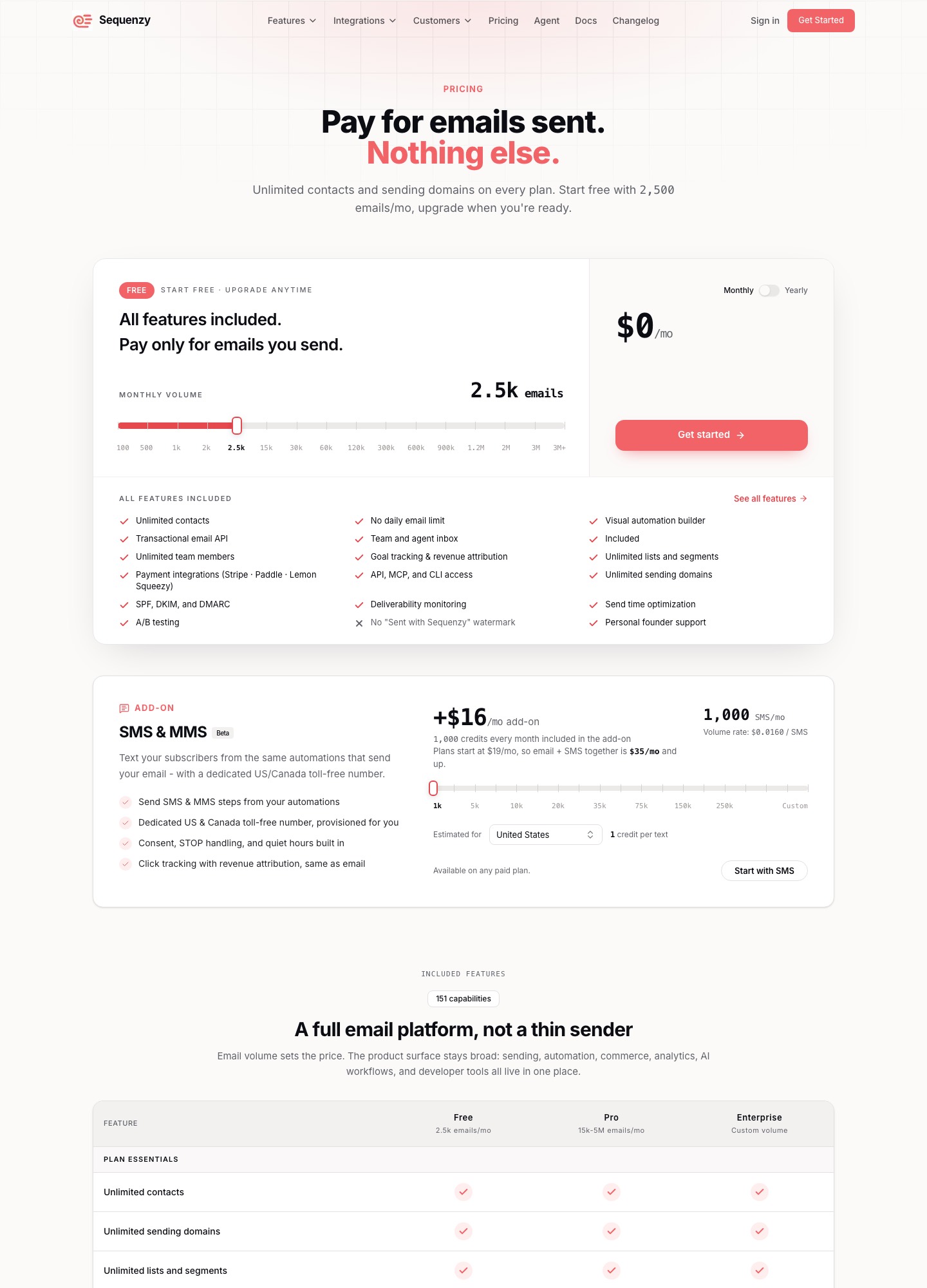
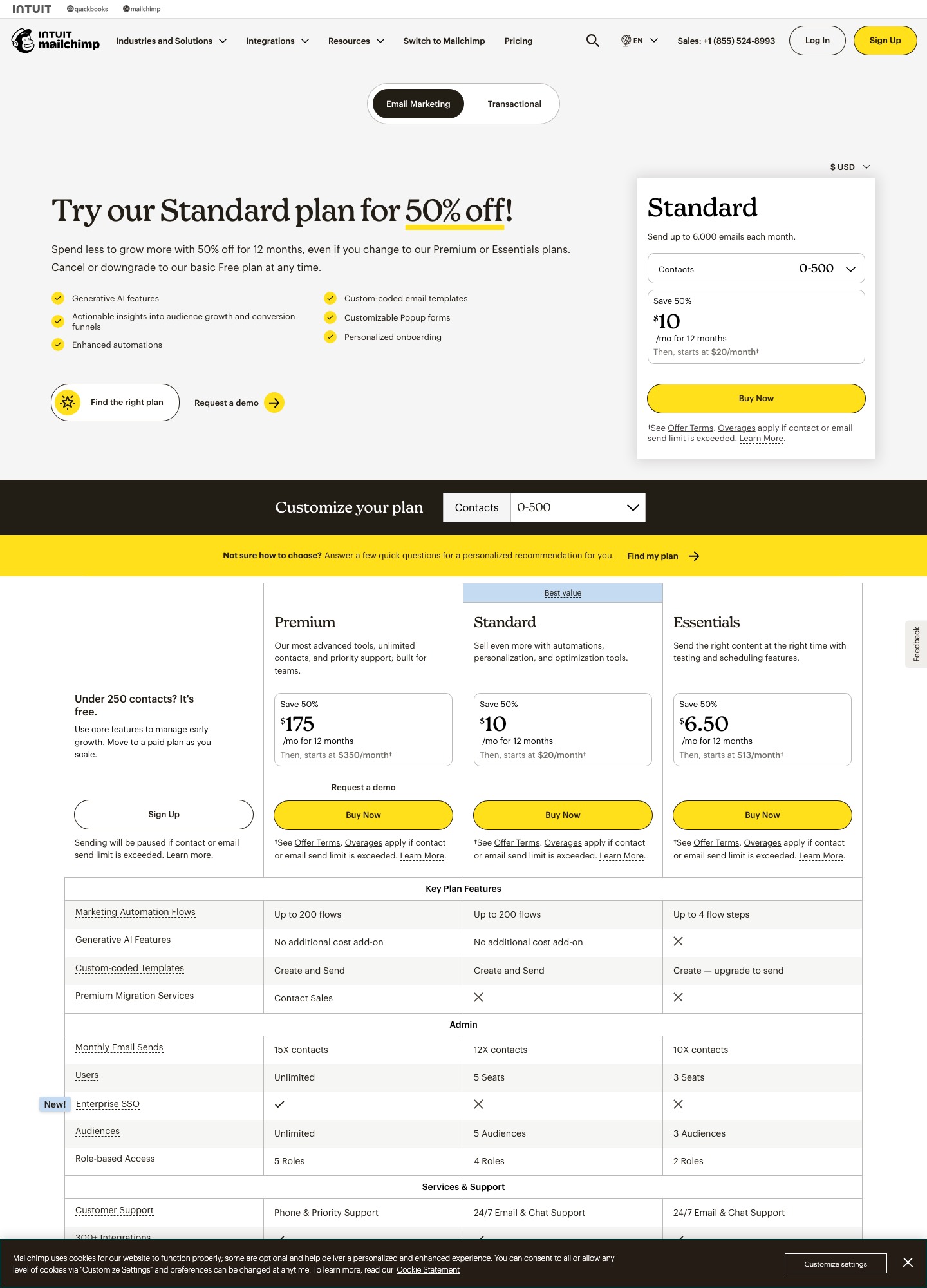
Pick Sequenzy when the emails you send are triggered by what happens in a SaaS product or its billing: a new Stripe subscription, a failed payment, a trial ending. Pick Mailchimp when you run newsletters and promotional campaigns for a small business, a shop or a local organisation and want the broadest toolbox with a free entry point. The two also count differently. Sequenzy's pricing page charges by emails sent a month (free for 2,500, then $19 for 15,000) and says contacts are unlimited. Mailchimp's pricing page charges by contacts: a free plan for up to 250 contacts and 500 sends a month, and Standard from $20 a month for 500 contacts.
Neither is the better tool across the board. A shop owner mailing a monthly promotion to 3,000 customers and a SaaS founder wiring up a failed-payment sequence have different needs, and this page keeps the two apart. Prices checked 7 October 2026.
Side by side
| Sequenzy | Mailchimp | |
|---|---|---|
| What it is built for | Lifecycle and billing-triggered email for SaaS and subscription products, with campaigns and a transactional API in the same account | Newsletters, promotional campaigns, automations and SMS for small and mid-sized businesses |
| What you are billed on | Emails sent per month; unlimited contacts and sending domains on every plan | Contacts in the audience; a monthly send allowance that scales with the contact band |
| Free option | 2,500 emails a month | Free plan: 1 seat, 1 audience, up to 250 contacts, 500 sends a month (250 a day); 14-day trial of Standard |
| Paid plans on the pricing page | $19 (15,000 emails), $29 (30,000), $49 (60,000), $99 (120,000); the slider continues higher | Essentials from $13, Standard from $20, Premium from $350, all at the 500-contact selector |
| Feature gating | The page says all features are included on every plan; volume sets the price | Gated by plan: seats (3, 5, unlimited), send multiples (10×, 12×, 15× contacts), flow size and coded-template sending |
| Billing integrations | Stripe, Paddle, Lemon Squeezy, Polar, Creem and Dodo Payments listed; segments by MRR and LTV | Integrations menu lists 300+ connectors including Shopify, WooCommerce, Square and Stripe |
| Failed-payment emails | A Stripe invoice.payment_failed event starts a dunning email flow with a card-update page | No billing-event trigger is described on its pricing page |
| Team seats | Unlimited team members listed | 3 on Essentials, 5 on Standard, unlimited on Premium |
| SMS | SMS and MMS add-on, $16 a month including 1,000 credits, marked Beta | SMS add-on on paid plans in select countries, by application |
Sources: Sequenzy pricing, Sequenzy home page, Mailchimp pricing and Mailchimp marketing plans, read on 7 October 2026. Mailchimp plan prices on the first page are for the default 500-contact selector.
Why the price units matter more than the price
A price list that counts emails and one that counts contacts cannot be compared at face value. Sequenzy's $19 buys 15,000 emails a month whether they go to 500 people or 15,000. Mailchimp's $20 buys a 500-contact audience and, per its pricing page, a send ceiling of 12 times the contacts, which is 6,000 emails at that band. The cheaper product depends on how often you mail the people you have.
Take a weekly newsletter, which is 52 sends a year or about 4.3 a month. The table turns four list sizes into monthly email volume, picks the smallest Sequenzy volume tier that covers it, and sets Mailchimp's regular Standard price for the band beside it. Mailchimp's page also shows a half-price offer for the first 12 months, which we leave out because it ends.
| Contacts mailed weekly | Emails a month (× 4.33) | Sequenzy tier that covers it | Sequenzy twelve months | Mailchimp Standard band | Mailchimp twelve months |
|---|---|---|---|---|---|
| 500 | about 2,170 | Free, 2,500 emails | $0 | 500 contacts, $20 | $240 |
| 5,000 | about 21,700 | 30,000 emails, $29 | $348 | 2,501–5,000, $100 | $1,200 |
| 10,000 | about 43,300 | 60,000 emails, $49 | $588 | 5,001–10,000, $135 | $1,620 |
| 25,000 | about 108,300 | 120,000 emails, $99 | $1,188 | 20,001–25,000, $310 | $3,720 |
At weekly sending the per-email model costs a fraction as much: $348 against $1,200 at 5,000 contacts, and $1,188 against $3,720 at 25,000. Sequenzy's yearly toggle shows $313, $529 and $1,069 for its 30,000, 60,000 and 120,000 tiers, a little below twelve times the monthly price. Two cautions apply. First, Sequenzy's figure covers every email that leaves the account, so a welcome sequence for 500 new sign-ups a month (four emails each) adds 2,000 and a billing flow adds more. At 5,000 contacts the total of roughly 23,700 still sits inside the 30,000 tier, but a list that sends twice a week needs 43,300 and moves up a step. Second, we did not read whether transactional sends count against the same volume, so check that on the slider before you route receipts through it.
The picture flips for a list mailed daily. 5,000 contacts times 30 days is 150,000 emails, above the 120,000 top step we read on Sequenzy's slider, which continues to larger volumes whose prices we did not read. Mailchimp Standard at 5,000 contacts is capped at 60,000 sends on the 12× multiple, so neither tool suits a daily blast to that list without a conversation about overage rates. Mailchimp refers readers to its additional-charges help page for those.
Below 500 contacts the comparison is closer than it looks. A 250-person list mailed twice a month uses 500 sends, which fits inside Mailchimp's free plan exactly. A 500-person list mailed weekly needs about 2,170 emails, which fits inside Sequenzy's free 2,500 and costs $20 a month on Mailchimp Standard. Between 500 and 2,500 contacts we did not read Mailchimp's band prices, so use its selector.
What counts as a limit on each side
Mailchimp's gates are about people and features. Essentials has 3 seats and flows stop at 4 steps. Standard has 5 seats, up to 200 flows and the ability to send custom-coded templates, which Essentials can create but not send. Premium has unlimited seats and costs $350 a month at the 500-contact selector. A team of six that wants a dedicated client list per brand ends up on Premium whatever its list size.
Sequenzy's page lists nothing of that sort: unlimited team members, contacts, lists, segments and sending domains sit beside A/B testing, SPF, DKIM and DMARC setup, deliverability monitoring and the visual automation builder, all included from the free tier. It also lists "No daily email limit", and a "Sent with Sequenzy" watermark is crossed out. The only dial is monthly email volume. The trade is that you cannot buy "a bit more for the small plan": the next step after $19 is $29.
Billing events and failed payments
This is the clearest difference in job. Sequenzy's home page says you connect Stripe once and each event starts a flow for a segment built from plan, MRR and engagement data. For failed payments it says the Stripe invoice.payment_failed event starts a dunning email sequence with a card-update page. That covers the emails. Retrying the charge is still done by Stripe or Paddle, and Sequenzy does not replace their retry settings. The pricing page also lists revenue attribution and goal tracking, so a sequence can be judged by revenue rather than clicks.
Mailchimp lists a Stripe connector in its integrations menu, and the page lists audience segmentation, automation and dynamic content. We did not find a billing-event trigger or dunning flow described on its pricing page, and we did not test what the Stripe connector passes into an audience, so confirm with a test account before you plan a payment-recovery sequence there. If your emails are mainly "a customer did X in our product, so send Y", read email for Stripe-billed products and churn prevention email next.
Campaign marketing and e-commerce
Here Mailchimp leads on what its page spells out: pop-up forms that capture subscribers for both email and SMS, predictive segmentation aimed at repeat buyers, A/B and multivariate tests, dynamic content that swaps blocks by segment, and integrations with Shopify, WooCommerce, Square, Wix, Canva and WordPress. Its Free plan means a hobby project or a church newsletter never needs a card. Sequenzy's page lists Shopify, and WooCommerce and WordPress plugins marked Beta, so it can serve a shop, but its centre of gravity is subscription software. A boutique selling 2,000 products through Shopify is better served by Mailchimp or a Shopify-focused tool than by a SaaS lifecycle product.
Choose Sequenzy if…
- you sell software by subscription through Stripe, Paddle or Lemon Squeezy and want failed payments, trial endings and cancellations to start emails by themselves;
- your list is large but you send moderately: unlimited contacts at a per-email price is the cheaper unit, as the table shows;
- you want marketing emails and transactional mail in one account with one API;
- a team of any size needs access without moving to a higher plan.
Choose Mailchimp if…
- you run a shop, a local business or a club and want pop-up forms, templates, SMS and e-commerce connectors in one place;
- your audience is under 250 people and you mail it a couple of times a month, which the free plan covers;
- you need one cheap paid step, since Standard from $20 includes up to 200 flows and coded-template sending;
- your list is small and your emails are broadcasts, so billing-triggered logic would sit unused.
If neither fits, Mailchimp alternatives lists wider options, MailerLite vs Mailchimp and Campaign Monitor vs Mailchimp put Mailchimp against its closest campaign rivals, and the consumer SaaS guide covers the product-email side.
Moving between them
From Mailchimp to Sequenzy, export each audience as a CSV, merge and deduplicate it, and bring across only the fields you will segment on, such as plan, sign-up date and status. Rebuild automations by hand. Mailchimp flows do not translate to another tool, and the first one worth rebuilding is the welcome series. Authenticate your sending domain in the new account and send to a small segment first. In the other direction, check how many contacts you would carry into Mailchimp, because its price moves with the band, and remember that product-event triggers have no direct equivalent on its plans.
FAQ
Is Sequenzy cheaper than Mailchimp?
Per email it usually is for a list that is mailed weekly or less: the table above shows $348 against $1,200 a year at 5,000 contacts. For a list under 250 people mailed twice a month, Mailchimp's free plan costs nothing, and Sequenzy's free tier covers up to 2,500 emails a month.
Does Sequenzy have a free plan?
Yes. Its pricing page offers 2,500 emails a month at $0 with unlimited contacts, and the first paid step is $19 for 15,000 emails. Mailchimp's free plan is limited to 250 contacts and 500 sends a month.
Can Mailchimp send dunning emails for failed Stripe payments?
We found no such trigger described on its pricing page. Sequenzy says a Stripe invoice.payment_failed event starts a dunning flow with a card-update page. Stripe's own settings and Paddle handle retries, so test either tool against your billing setup before relying on it.
Which is better for a newsletter to a few thousand people?
For a plain newsletter, price decides. At 5,000 contacts mailed weekly the arithmetic favours Sequenzy's per-email plans, while Mailchimp offers more templates, pop-up forms and e-commerce connectors. If you want a writer-focused option instead of either, compare Sequenzy vs Buttondown.