Two-product comparison
Sequenzy vs Buttondown: a newsletter for readers or email for a product
Short answer
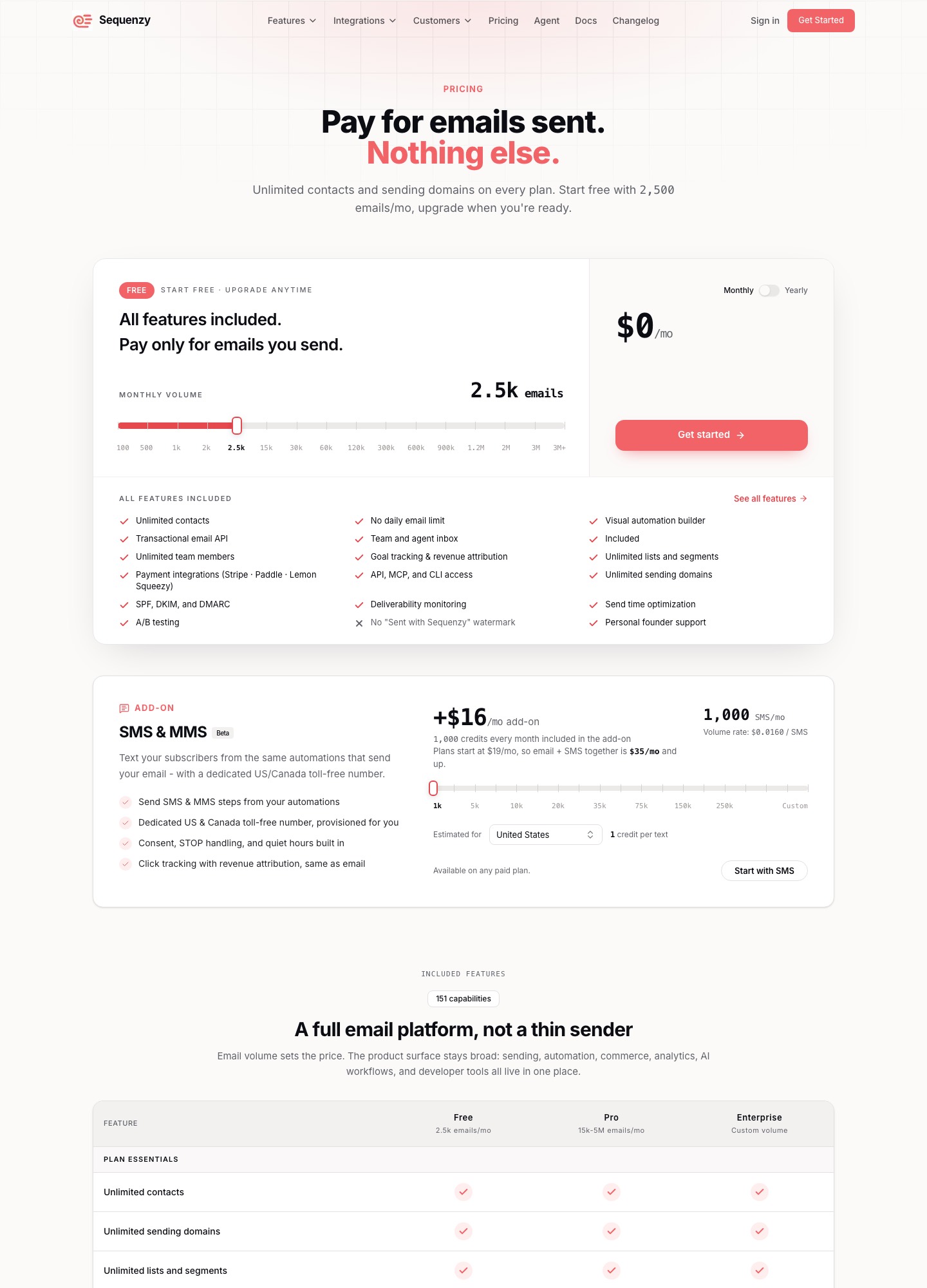
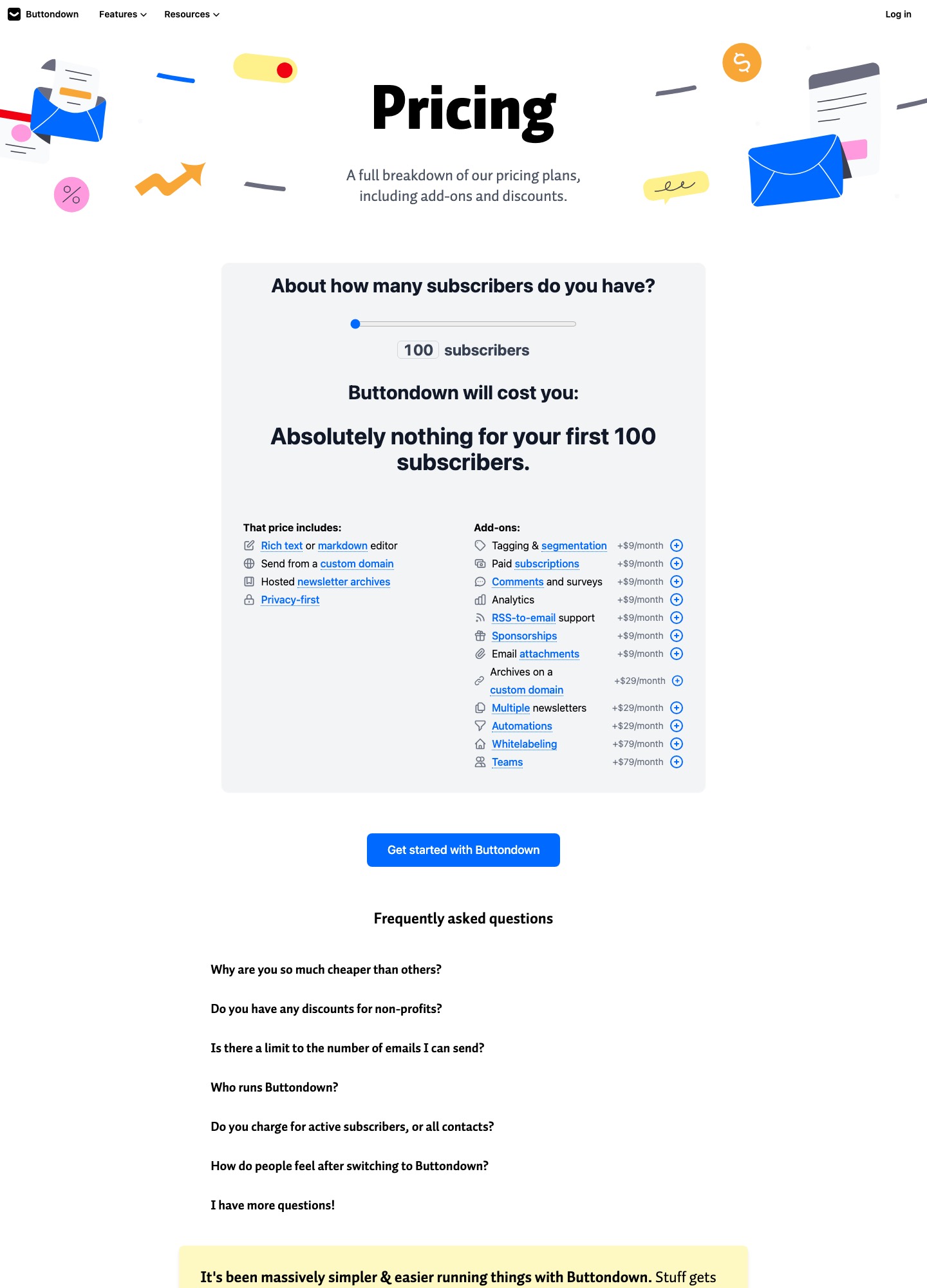
Choose Buttondown if you are a writer whose product is the newsletter itself: an editor in Markdown or rich text, a hosted archive, a custom sending domain, and add-ons for paid subscriptions, sponsorships and RSS-to-email. Buttondown's pricing page says the first 100 subscribers cost nothing and lists add-ons at +$9, +$29 and +$79 a month. Choose Sequenzy if the email belongs to a software product: welcome series, trial reminders, billing-triggered messages and a transactional API. Sequenzy's pricing page starts free at 2,500 emails a month and charges $19 for 15,000.
One gap before you compare totals: we did not read what Buttondown's slider charges once you pass 100 subscribers, so this page puts Buttondown's feature prices against Sequenzy's volume prices and does not invent the missing figure. Prices checked 7 October 2026.
Side by side
| Sequenzy | Buttondown | |
|---|---|---|
| Built for | Lifecycle email for SaaS and subscription products, plus campaigns and transactional sends | Newsletters written and published by an author or a small team |
| Free option | 2,500 emails a month, unlimited contacts | Nothing to pay for the first 100 subscribers |
| Paid pricing basis | Monthly email volume: $19 for 15,000, $29 for 30,000, $49 for 60,000, $99 for 120,000 | Subscribers on a slider (above 100 not read), plus feature add-ons billed per month |
| Features and plans | The page says every feature is included on every plan; only volume changes the price | Base price includes the editor, a custom sending domain and hosted archives; the rest is bought as add-ons |
| Add-ons listed | SMS and MMS, $16 a month with 1,000 credits (Beta) | +$9: tagging and segmentation, paid subscriptions, comments and surveys, analytics, RSS-to-email, sponsorships, email attachments. +$29: archives on a custom domain, multiple newsletters, automations. +$79: whitelabeling, teams |
| Who is billed | Emails sent, regardless of contact count | Active subscribers: the page says you pay only for people actively receiving your emails |
| Product and billing triggers | Stripe, Paddle, Lemon Squeezy and others; a Stripe invoice.payment_failed event starts a dunning email flow with a card-update page | No billing-event triggers described on the pricing page |
| Developer access | API, MCP server and CLI listed on the pricing page | A REST API, described in its docs as designed to be as RESTful and uninteresting as possible |
Sources: Sequenzy pricing, Sequenzy home page and Buttondown pricing, read on 7 October 2026 with Buttondown's slider at 100 subscribers.
Two pricing menus that do not line up
Buttondown sells a small base and lets you add what you need. The base includes the writing editor, a custom sending domain and hosted archives. Everything else is a switch with a price: tagging and segmentation at +$9 a month, automations at +$29, teams at +$79. Sequenzy does the reverse. It includes everything and prices by how many emails leave the account. Totals therefore depend on which features you need and how many emails you send, not on one list size.
Three worked cases show where each model lands. They use only prices we read.
- A 100-subscriber newsletter sent weekly. That is about 430 emails a month (100 × 4.33). Buttondown costs $0 and Sequenzy's free tier covers it too, so price does not decide. The deciding question is whether you want a public archive and an editor made for writing, which Buttondown includes in the base price.
- A writer who wants paid subscriptions, tagging and sponsorships. Those are three +$9 add-ons, $27 a month, plus whatever the slider charges for subscribers above 100. Add the +$29 automations add-on and the add-ons alone reach $56 a month ($27 + $29). We did not see a feature on Sequenzy's pricing page for selling paid newsletter subscriptions to readers, so this buyer is better served by Buttondown.
- A SaaS with 5,000 users and a weekly product email. About 21,700 emails a month (5,000 × 4.33) fit the $29 tier for 30,000 emails, $348 for twelve months with every feature included, and the tier's yearly price on the page is $313. Here Buttondown would need its subscriber price at 5,000, which we did not read, plus the $9 segmentation and $29 automations add-ons just to approach what a lifecycle tool does by default.
Sequenzy's per-email unit has a cost of its own. Mailing 1,000 subscribers every day is 30,000 emails, which uses the whole $29 tier by itself, and welcome or billing emails sit on top. A frequent newsletter to a modest list can cost more per month on a volume plan than on a subscriber plan, and that is the situation where checking Buttondown's slider is worth five minutes. Buttondown's page says it bills active subscribers only, so a list with many inactive addresses may also cost less there than a contact-based plan elsewhere.
Writing and publishing
This is Buttondown's ground. Its price page lists a rich text or Markdown editor, hosted archives for the newsletter and a custom sending domain in the base price, with archives on your own domain as a +$29 add-on, comments and surveys at +$9, and RSS-to-email at +$9 for turning a blog feed into issues. If your growth comes from people finding old issues, the archive is part of the product. We did not see a hosted issue archive, comments or RSS-to-email among the capabilities Sequenzy lists on its pricing page. What it lists instead is hosted signup landing pages, a visual automation builder, AI-generated sequences and campaign drafts, and A/B testing. We have not compared the two editors in use, so we make no claim about which writes better.
Automation and billing events
Buttondown's automations are a +$29 add-on, which makes sense for a writer who wants a welcome sequence or a re-engagement series. Sequenzy aims at emails that start from something a customer does. Its home page says you connect Stripe or PostHog once, or send your own events with a single POST, and each event starts the right flow for a segment built from plan, MRR and engagement data. For failed payments it says the Stripe invoice.payment_failed event starts a dunning email flow with a card-update page. Retrying the card is Stripe's or Paddle's task, so Sequenzy covers the messages, not the retry schedule. If you run a SaaS, email for Stripe-billed products goes deeper on those flows.
Choose Buttondown if…
- you are an independent writer, a developer with a technical blog or a small publisher, and the newsletter is the product;
- you want to start at zero for 100 subscribers and buy paid subscriptions, sponsorships or analytics only when you need them;
- you care about a hosted archive, Markdown and a plain REST API more than lifecycle automation;
- you run more than one publication and are happy to pay the +$29 multiple-newsletters add-on only if you need it.
Choose Sequenzy if…
- you ship software with subscriptions through Stripe, Paddle or Lemon Squeezy and want billing and product events to start emails;
- you want marketing emails and transactional sends under one account, with the free tier covering the first 2,500 emails;
- you want a price you can work out from sending volume, with unlimited team members and sending domains;
- you would rather not buy feature add-ons one at a time.
Still undecided? Buttondown vs beehiiv compares the newsletter side in depth, Sequenzy vs Mailchimp covers the campaign-tool side, and Buttondown alternatives lists wider options.
Moving between them
Buttondown to Sequenzy: export your subscribers, keep the tags you segment on, and rebuild automations by hand in the new builder. Your archive of past issues does not move with the list, so keep a copy of any pages that carry search traffic before you cancel the old plan. Sequenzy to Buttondown: bring over subscribers who are meant to receive a newsletter, not users who only receive product notices, because mixing the two in a subscriber-priced plan raises the bill without raising readership. Authenticate the sending domain in the new account and send a small test issue before you switch the signup form.
FAQ
Is Buttondown free?
For the first 100 subscribers, yes: its pricing page says it will cost "absolutely nothing", and the editor, custom sending domain and archives are included. Beyond 100 you pay according to its slider, which we did not read, and each feature beyond the base is an add-on from $9 a month.
Is Sequenzy free?
Its pricing page offers 2,500 emails a month at $0 with unlimited contacts. The first paid step is $19 for 15,000 emails a month.
Which is better for a paid newsletter?
Buttondown. It lists a paid subscriptions add-on at +$9 a month, plus sponsorships and email attachments, and we did not see an equivalent on Sequenzy's pricing page. Sequenzy's billing integrations are for your own product's customers.
Which is better for a SaaS onboarding sequence?
Sequenzy is built around that job, with Stripe, Paddle and Lemon Squeezy integrations and billing-triggered flows. Buttondown can send a welcome series through its automations add-on, but its pricing page lists no connection to your billing events.