Newsletter platforms: two-product comparison
Buttondown vs beehiiv: a minimal writing tool or a growth platform?
Short answer
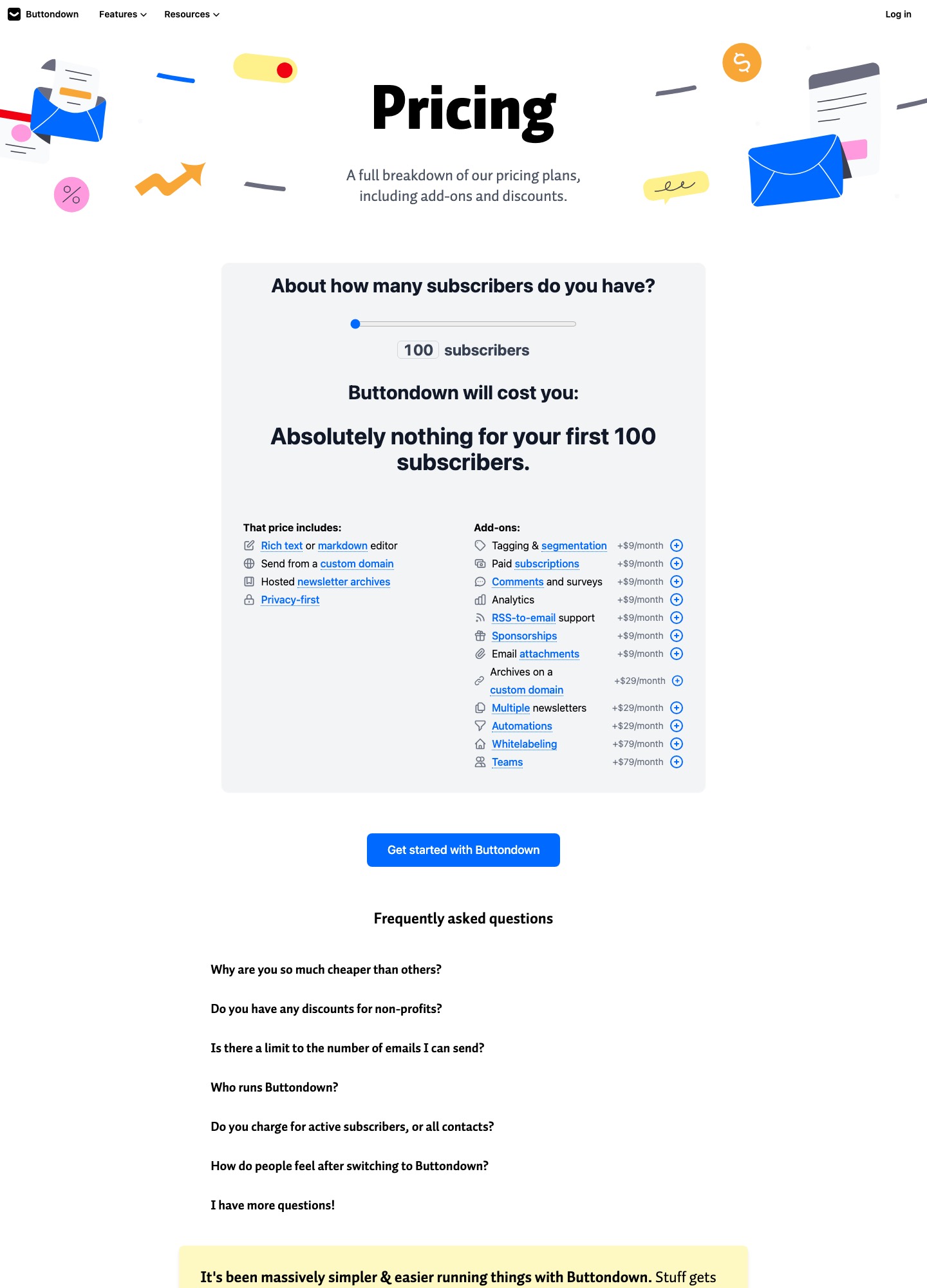
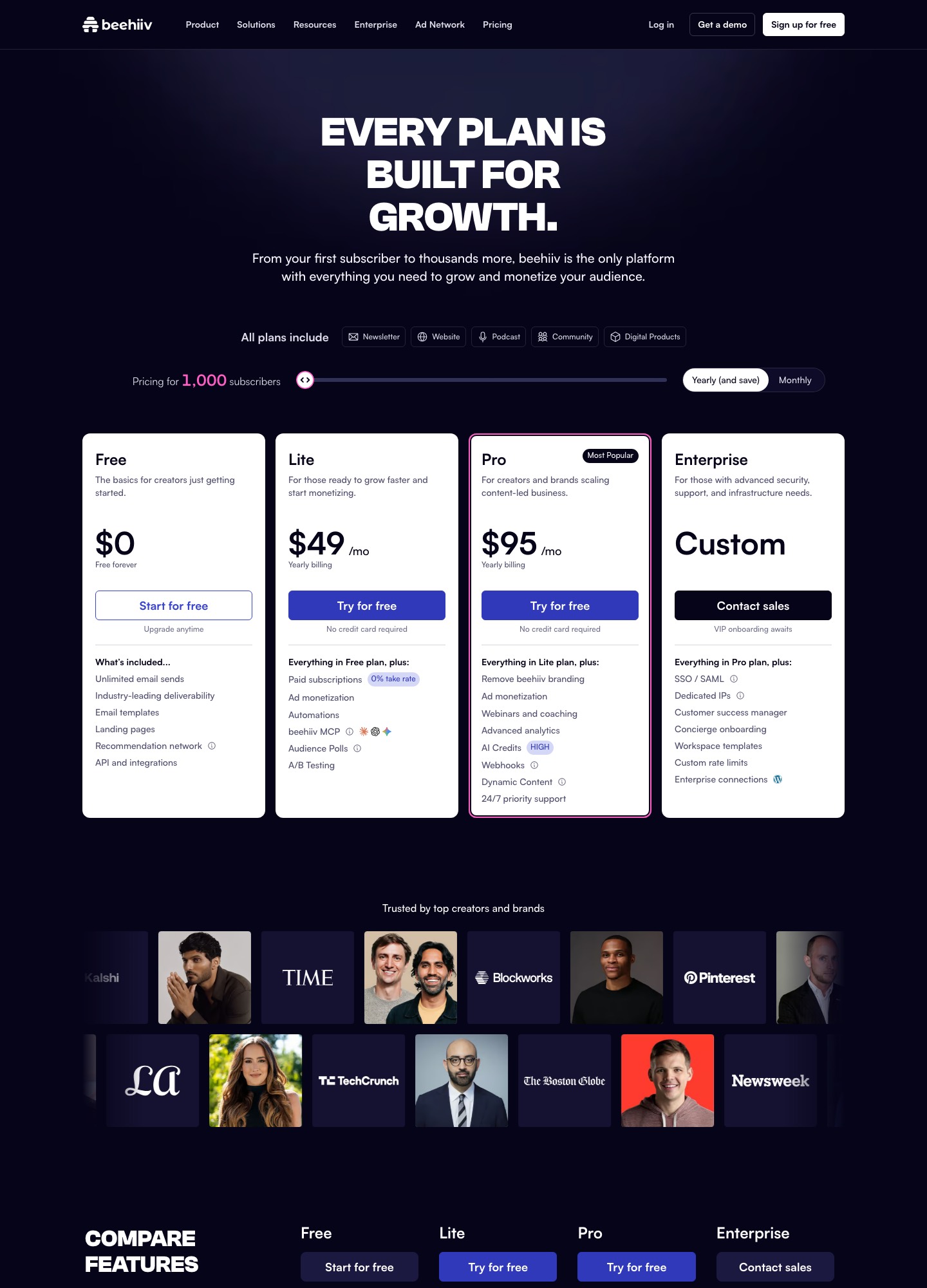
Pick Buttondown if you write in Markdown or rich text, want to pay only for the features you switch on, and will bring your own plan for finding readers. Pick beehiiv if you want a free plan that stretches to 2,500 subscribers, plus a recommendation network, ad monetization and a built-in website. On Buttondown's pricing page the first 100 subscribers cost nothing and optional add-ons run +$9, +$29 or +$79 a month. beehiiv's pricing page lists Free (up to 2,500 subscribers), Lite at $49 a month and Pro at $95, on yearly billing with its slider at 1,000 subscribers.
One gap to know about: we did not read what Buttondown charges per subscriber beyond the first 100, so move its slider to your own list size before you compare totals. Prices checked 7 October 2026.
Plans and features side by side
| Buttondown | beehiiv | |
|---|---|---|
| Free plan | Nothing for the first 100 subscribers; includes a rich text or Markdown editor, sending from a custom domain and hosted archives | Free forever: up to 2,500 subscribers, unlimited email sends, 1 publication, 1 team seat, templates, landing pages, the recommendation network and API access |
| How paid features are sold | Separate add-ons: +$9, +$29 or +$79 a month each, on top of a subscriber-based price from the page's slider | Plans: Lite $49 a month and Pro $95 a month on yearly billing, with the slider at 1,000 subscribers |
| Paid subscriptions | Add-on, +$9/month | From Lite; the pricing page states a 0% take rate, and Stripe's own processing fee still applies |
| Automations | Add-on, +$29/month | From Lite |
| Segmentation and analytics | Tagging & segmentation +$9/month; analytics +$9/month | Campaign analytics on every plan; advanced analytics on Pro; analytics history of 30 days on Free, 12 months on Lite, unlimited on Pro |
| Several newsletters | Multiple newsletters add-on, +$29/month | 1 publication on Free, 3 on Lite, 10 on Pro |
| Team seats | Teams add-on, +$79/month | 1 on Free, 2 on Lite, 10 on Pro |
| Removing the vendor's branding | Whitelabeling add-on, +$79/month | Pro and above |
| Sponsorship and ad income | Sponsorships add-on, +$9/month | Ad monetization from Lite; ad network and direct sponsorships in its product menu |
| Support | Not stated on the pricing page | 24/7 priority support on Pro |
| Subscriber counting | Charges for active subscribers, those actually receiving your emails | Counts unique email addresses subscribed to the publication |
Sources: Buttondown pricing and beehiiv pricing, read on 7 October 2026. beehiiv's page also shows a monthly billing toggle, and says yearly billing saves up to 20%; the plan prices above are the yearly figures. We did not read beehiiv at other slider positions.
Two ways of charging for the same features
Buttondown now prices like a menu. A slider sets the base price, which is nothing for the first 100 subscribers, and every feature you tick adds its own monthly amount. beehiiv sells bundles: Lite and Pro each include a set of features and raise the subscriber ceiling. Lining up what a paid newsletter usually needs shows where the two cross over. The Buttondown column below is add-ons only, before whatever the slider charges for your subscribers.
| What you want to switch on | Buttondown add-ons per month | beehiiv plan that covers it |
|---|---|---|
| Paid subscriptions | $9 | Lite, $49 |
| Paid subscriptions and automations | $9 + $29 = $38 | Lite, $49 |
| Those two plus tagging & segmentation and analytics | $38 + $9 + $9 = $56 | Lite, $49 (advanced analytics is a Pro feature at $95) |
| Paid subscriptions, automations, multiple newsletters and a team | $9 + $29 + $29 + $79 = $146 | Pro, $95, with 10 seats and 10 publications |
So Buttondown is the cheaper route while you need one or two features, and beehiiv's bundle overtakes it when the add-ons stack: four features at $56 already exceed Lite's $49, and the team-and-newsletters set at $146 is $51 above Pro. Buttondown's subscriber charge sits on top of those add-on figures, and beehiiv's plan prices also move with its slider, so treat the table as a comparison of feature prices, not of totals.
A concrete small case: 100 subscribers, one paid tier, one welcome automation. On Buttondown that is $38 a month, or $456 a year, because the first 100 subscribers cost nothing. beehiiv's Free plan has no paid subscriptions or automations, so you would need Lite at $49, which is $588 a year using the figure shown at its 1,000-subscriber slider position: $132 more. The picture changes as soon as the audience grows past what Buttondown's free allowance covers.
The reverse case is a free newsletter with 2,000 readers and no paid features. beehiiv's Free plan covers that at $0, because its ceiling is 2,500. Buttondown would charge its slider price for the 1,900 subscribers above the free 100, a number we did not read, so check it before assuming either side is cheaper. One detail may help Buttondown: it says it charges for active subscribers, those actually receiving your emails, whereas beehiiv counts every unique subscribed address against its 2,500, 100,000 and 250,000 limits.
Finding readers: what is built in
beehiiv puts audience growth inside the product. Its Free plan lists a recommendation network and landing pages, its menu groups a referral program, subscribe forms, pop-ups and magic links under "Grow", and the pricing page opens with "Every plan is built for growth." Buttondown's pricing page lists none of these. What it lists instead is a rich text or Markdown editor, sending from your own domain, hosted archives and a privacy-first stance. If your readers will come from places you already own, such as a blog, conference talks or a social following, the missing network costs you little. If you are starting from zero and want other newsletters to send readers your way, the recommendation network on beehiiv's free plan is the concrete reason to begin there.
Earning from the newsletter
Both can charge readers. On Buttondown, paid subscriptions is a +$9 add-on, and sponsorships and email attachments are two more +$9 add-ons. On beehiiv, paid subscriptions arrive with Lite at $49; the plan card shows a 0% take rate and the FAQ says you keep your earnings minus Stripe's standard fee of 2.9% + $0.30 per transaction. beehiiv also lists digital products at 0% commission, an ad network and direct sponsorship tools, and a podcast host and community on every plan. We did not read Buttondown's payment terms, so check what it takes from paid subscriptions before you compare net income.
Stripe's fixed 30 cents matters at low prices. As an illustration, 200 readers each paying $5 a month is $1,000 gross, and 2.9% plus $0.30 on each of those 200 charges is $29 + $60 = $89, leaving $911 before any platform fee. At $10 a month the same 200 readers cost $58 + $60 = $118 on $2,000 gross. The example prices are made up to show the arithmetic and are not either vendor's plans.
Writing, archives and the developer angle
Buttondown's base price includes a rich text or Markdown editor, a custom sending domain and hosted archives. Archives on your own domain are a separate +$29 add-on, so the included hosted archive does not sit on your own domain. Its docs describe an API designed to be as RESTful and uninteresting as possible (API introduction). beehiiv's Free plan lists API and integrations too, its menu shows a Send API, and its pricing card puts an MCP server on Lite and webhooks on Pro. Scripted publishing is feasible on both, so read each one's docs against your own workflow before you commit.
The website question tilts toward beehiiv: its page says the website, podcast, community and digital products are included on every plan, and that what changes as you move up is limits, support and advanced features. On Buttondown, owning the domain your archive lives on is a paid decision.
Choose Buttondown if…
- you write in Markdown, want your own sending domain from the free tier, and would rather pay for each extra feature than for a bundle you only half use;
- your list is near the first 100 subscribers and you need one or two paid features, since $9 for paid subscriptions or $38 with automations undercuts Lite's $49;
- readers reach you through channels you already run, so a recommendation network would add little;
- you care that the pricing page calls the product privacy-first and bills for active subscribers only.
Choose beehiiv if…
- your list is somewhere between 100 and 2,500 and you want to publish for free, with unlimited sends and a website, landing pages and the recommendation network included;
- you plan to charge readers or sell ads: Lite adds paid subscriptions at a stated 0% take rate, automations and ad monetization in one $49 plan;
- you need more than one writer or publication, since Pro lists 10 seats and 10 publications for $95 against $108 in Buttondown's Teams and Multiple newsletters add-ons alone;
- you want a podcast or community alongside the newsletter without adding another vendor.
If you are weighing other platforms as well, beehiiv vs Substack and Buttondown vs ConvertKit put each tool against a different rival, Buttondown alternatives and beehiiv alternatives list wider options, and our newsletter tool guide and notes on building a newsletter audience cover the growth side that neither pricing page answers.
Moving between them
The subscriber list is the easy part: both tools work from an email address per reader, so export a CSV from the old platform, import it into the new one and keep an eye on the count, because that count sets your tier. On beehiiv it is every unique subscribed address. Buttondown's page says it bills for the people actively receiving your emails, so ask how it treats unengaged or bounced addresses before you assume they are free. beehiiv's menu links a migration guide, which we did not read, so use it for the import steps rather than relying on this page.
The parts that do not travel by CSV are the ones to plan. Back issues are archives you will need to carry over or leave behind at the old address. Paid readers are billed through Stripe on beehiiv, as its fee note shows, so ask both vendors' support how existing paying subscribers move before you announce a switch. Automations and segments are rebuilt by hand, which in Buttondown's case means switching on the $29 automations add-on and the $9 tagging add-on first. Going from Buttondown to beehiiv, remember that Free allows one team seat and one publication, so a second newsletter means Lite at $49.
FAQ
Is Buttondown cheaper than beehiiv?
For a list near 100 subscribers, yes: Buttondown costs nothing there, and paid subscriptions add $9 a month against beehiiv Lite's $49. Beyond 100 subscribers we did not read Buttondown's slider price, while beehiiv's Free plan covers up to 2,500 subscribers at $0, so the answer turns on list size and which features you need.
Is beehiiv really free?
Its Free plan is listed as free forever for up to 2,500 subscribers, with unlimited email sends, 1 publication and 1 team seat. Paid subscriptions, automations, A/B testing and audience polls start on Lite at $49, and removing beehiiv's branding needs Pro at $95.
Can Buttondown run paid subscriptions and automations?
Yes, as separate add-ons: paid subscriptions at +$9 a month and automations at +$29. Tagging and segmentation, analytics, comments and surveys, RSS-to-email and sponsorships are +$9 each, and whitelabeling and teams are +$79 each.
Which suits a technical or developer-written newsletter?
Buttondown, if you want a Markdown editor and a documented REST API in a product that stays out of the way. beehiiv also lists an API, an MCP server on Lite and webhooks on Pro, so developers are not shut out there; the real question is whether you want its recommendation network, ad tools and website, which Buttondown's pricing page does not list.
Does beehiiv limit how many emails I can send?
No. Its FAQ says every plan includes unlimited email sends, and the ceilings are on subscribers: 2,500 on Free, 100,000 on Lite and 250,000 on Pro. Buttondown's page has a question about send limits that we did not open, so check its answer if you mail a large list frequently.