Campaign strategy guide
Email Blast vs Drip Campaign: Which One Should You Use?
A practical guide to choosing between one-off broadcasts and automated sequences, with 14 tools, pricing caveats, and a bounded pilot plan.
Short answer
Use a blast when relevance comes from a shared date, launch, issue, or promotion. Use a drip when relevance comes from a person’s signup, behavior, purchase, or trial age. Most mature programs use both, with explicit ownership and shared suppression rules.
Blast or drip? Start with the cause of relevance
| Situation | Surface | Operational test | Primary measure |
|---|---|---|---|
| A shared date or announcement | Blast | Review one audience and one message before scheduling. | Clicks, conversions, complaints, unsubscribes |
| A signup, action, or inactivity state | Drip | Define trigger, wait, branch, goal, and exit. | Goal completion, time-to-value, drop-off |
| A scheduled issue plus evergreen onboarding | Both | Give each surface one owner and a global suppression rule. | Incremental outcome and message fatigue |
An email blast is a campaign scheduled for a defined audience. A drip campaign is a workflow that decides when each person receives the next message. The distinction is not merely manual versus automated: it is whether the calendar belongs to the sender or to the subscriber’s context. A weekly newsletter is still a blast even when the platform sends it automatically every Tuesday.
The search-intent insight is that “blast vs drip” is usually a hidden ownership question. Ask who owns relevance: the editorial calendar, the product event, the sales stage, or the customer’s behavior. That answer determines the right trigger, suppression rule, and measurement plan more reliably than a feature checklist.
14 tools compared
Pricing and plan features change. The caveats below describe what to verify rather than claiming a permanent price. Follow each official link, model your audience and send volume, and run the same controlled pilot in two finalists.
| Tool | Best for | Pricing model to verify | Boundary |
|---|---|---|---|
| Mailchimp | General-purpose marketing teams | Verify contact tiers, included sends, seats, and automation gates; inactive or unsubscribed records can affect the bill. | Contact economics and feature gates need forecasting. |
| MailerLite | Small teams needing simple broadcasts and nurture | Check subscriber bands, send limits, templates, and automation access on the current plan. | Complex event orchestration may require extra systems. |
| Kit | Creators and independent publishers | Confirm subscriber caps, automation access, commerce terms, and transaction fees. | Less suited to transactional or deeply technical journeys. |
| beehiiv | Publication growth and referral-led newsletters | Verify subscriber, publication, referral, ad-network, and automation limits. | Lifecycle and transactional needs may require companion systems. |
| Buttondown | Minimal, Markdown-first newsletters | Confirm subscriber, send, API, and support limits; do not assume the smallest tier covers production needs. | Limited branching and commerce depth. |
| Substack | Writers building a hosted publication | Review current paid-subscription, payment, and platform-fee terms before forecasting revenue. | Less control over custom automation and data architecture. |
| Customer.io | Event-aware SaaS lifecycle messaging | Confirm profile, message, event, workspace, and data-retention assumptions against real volume. | Requires disciplined data and lifecycle governance. |
| ActiveCampaign | Conditional campaigns and sales follow-up | Check contact tiers, seats, feature bundles, and automation limits. | More setup and governance than a newsletter-only program. |
| HubSpot Marketing Hub | CRM-connected broadcasts and sales handoffs | Model marketing-contact, seat, onboarding, and tier-specific automation costs. | Suite complexity and total cost can be disproportionate. |
| Brevo | Teams combining marketing and transactional email | Separate send-volume, contact, automation, SMS, and transactional pricing in the forecast. | Cross-stream and channel economics need care. |
| Resend | Developer-owned product announcements | Check email volume, domains, API, team, and support limits. | Contact-priced marketing plans differ from its per-email sending plans. |
| Postmark | Transactional streams beside marketing campaigns | Confirm message-stream, volume, add-on, and support pricing. | Not a full promotional campaign platform. |
| Klaviyo | Commerce campaigns with purchase-aware drips | Forecast profiles, email, SMS, and channel consent separately; commerce data can expand billable volume. | Too broad for publication-only programs. |
| Omnisend | Ecommerce teams coordinating email and SMS | Confirm contacts, sends, SMS, automation, and channel allowances on current plans. | Channel cost and consent complexity. |
1. Mailchimp: General-purpose marketing teams
Mailchimp is a sensible starting point when a generalist marketer needs familiar campaign production, audience management, templates, and basic customer journeys in one workspace. It is strongest when the blast is the visible campaign and the drip is a straightforward follow-up.
The important test is not whether it can send. Model the next list tier, then confirm that audience boundaries, merge fields, unsubscribe handling, exports, and click tracking behave as your operating process requires. A familiar editor does not remove the need for a suppression policy.
| Pros | Cons | Pricing caveat | Bounded pilot |
|---|---|---|---|
| Accessible production and a broad integration ecosystem. | Contact economics and feature gates need forecasting. | Verify contact tiers, included sends, seats, and automation gates; inactive or unsubscribed records can affect the bill. | Send one segmented blast, then enroll non-converters in a three-step welcome path. |
Check Mailchimp official information for current capabilities, limits, and terms.
2. MailerLite: Small teams needing simple broadcasts and nurture
MailerLite fits a small team that wants forms, newsletters, landing pages, and uncomplicated automation without a large implementation project. It can be a good operational match when one person owns both the weekly issue and the basic follow-up.
Before choosing it, test how groups, custom fields, preferences, and exits work together. Forecast the point at which more advanced event logic or reporting would require workarounds; a low entry price is less useful if the team cannot explain who is eligible for the next email.
| Pros | Cons | Pricing caveat | Bounded pilot |
|---|---|---|---|
| Approachable workflow for newsletters and simple sequences. | Complex event orchestration may require extra systems. | Check subscriber bands, send limits, templates, and automation access on the current plan. | Import a consented test group, send a blast, and test an automation exit after a conversion. |
Check MailerLite official information for current capabilities, limits, and terms.
3. Kit: Creators and independent publishers
Kit is designed around a creator publishing model: forms, tags, broadcasts, sequences, and audience ownership. Choose it when the email itself is the product and the drip should extend a reader’s interest rather than coordinate a complex sales or product-event system.
Its boundaries matter. It is not the natural home for password resets or deep account-event modeling, and a creator should verify exports, preference management, paid-offer suppression, and the exact automation available on the chosen tier. Pilot a real issue before moving the full list.
| Pros | Cons | Pricing caveat | Bounded pilot |
|---|---|---|---|
| Creator-focused publishing and tagging. | Less suited to transactional or deeply technical journeys. | Confirm subscriber caps, automation access, commerce terms, and transaction fees. | Publish one issue and enroll only readers who did not click in a short sequence. |
Check Kit official information for current capabilities, limits, and terms.
4. beehiiv: Publication growth and referral-led newsletters
beehiiv belongs on the shortlist when the newsletter is operated as a media property. Its value is in combining recurring publication with growth surfaces such as recommendations or referrals, so the blast is part of an acquisition and retention loop.
It is a weaker default when the drip depends on product events, sales ownership, or transactional reliability. Test source attribution, export behavior, consent controls, welcome timing, and whether referral or monetization economics actually improve retained subscribers rather than only registrations.
| Pros | Cons | Pricing caveat | Bounded pilot |
|---|---|---|---|
| Publication workflow with growth-oriented features. | Lifecycle and transactional needs may require companion systems. | Verify subscriber, publication, referral, ad-network, and automation limits. | Run one referral experiment and compare second-issue retention with a control cohort. |
Check beehiiv official information for current capabilities, limits, and terms.
5. Buttondown: Minimal, Markdown-first newsletters
Buttondown is a good fit for writers, engineers, and small editorial teams that want a low-distraction way to publish. A simple blast workflow can be an advantage when the main bottleneck is writing consistently, not designing a multi-branch campaign.
That simplicity means fewer built-in growth, commerce, and behavioral layers. Use it when portability and editorial control matter more than a visual journey builder, and keep any complex onboarding or transactional logic in a system designed for that job.
| Pros | Cons | Pricing caveat | Bounded pilot |
|---|---|---|---|
| Focused editorial workflow and clean output. | Limited branching and commerce depth. | Confirm subscriber, send, API, and support limits; do not assume the smallest tier covers production needs. | Send one issue, validate unsubscribe and archive paths, and keep the drip in a separate test system. |
Check Buttondown official information for current capabilities, limits, and terms.
6. Substack: Writers building a hosted publication
Substack makes sense when speed from writing to hosted publication and reader subscriptions is the primary requirement. The blast is naturally the recurring issue, while the drip is usually a lighter welcome or reader-conversion layer around the publication.
It is less appropriate when you need bespoke lifecycle logic, a product event stream, or control over every data flow. Pilot the signup, welcome, export, paid conversion, and unsubscribe paths before assuming the hosted model will support a more complex marketing program.
| Pros | Cons | Pricing caveat | Bounded pilot |
|---|---|---|---|
| Fast publication and subscription setup. | Less control over custom automation and data architecture. | Review current paid-subscription, payment, and platform-fee terms before forecasting revenue. | Run a short free series and test a paid-interest path before migrating a full audience. |
Check Substack official information for current capabilities, limits, and terms.
7. Customer.io: Event-aware SaaS lifecycle messaging
Customer.io is a strong choice when a “blast” still needs product context: a launch announcement can differ for an activated user, an inactive trial, and a customer who already uses the feature. The drip can then continue from the same event model.
The platform rewards technical ownership. Define identity, event names, consent, suppression, retention, and failure monitoring before writing branches. If the event stream is unreliable, a sophisticated sequence only automates uncertainty and makes diagnosis harder.
| Pros | Cons | Pricing caveat | Bounded pilot |
|---|---|---|---|
| Powerful event and identity-based orchestration. | Requires disciplined data and lifecycle governance. | Confirm profile, message, event, workspace, and data-retention assumptions against real volume. | Trigger one release path from a documented event and add an activation exit plus a holdout. |
Check Customer.io official information for current capabilities, limits, and terms.
8. ActiveCampaign: Conditional campaigns and sales follow-up
ActiveCampaign fits a team that sees a blast as the start of a branching journey: tag a click, wait for a behavior, score an account, or alert sales. Its advantage is the follow-up logic around the send rather than the one-off campaign alone.
That flexibility brings maintenance cost. Document tags, goals, waits, exits, and owners, then verify that a purchase, unsubscribe, or conversion really prevents later promotional messages. Keep the workflow understandable to the person who will troubleshoot it six months later.
| Pros | Cons | Pricing caveat | Bounded pilot |
|---|---|---|---|
| Deep branching, scoring, and handoffs. | More setup and governance than a newsletter-only program. | Check contact tiers, seats, feature bundles, and automation limits. | Rebuild one post-blast branch and test every exit with synthetic contacts. |
Check ActiveCampaign official information for current capabilities, limits, and terms.
9. HubSpot Marketing Hub: CRM-connected broadcasts and sales handoffs
HubSpot is compelling when eligibility and follow-up depend on lifecycle stage, owner, form, deal, or other CRM context. The blast and drip can share a customer record, which makes the sales handoff visible instead of leaving campaign activity in a separate silo.
That shared model also creates implementation work. Audit contact sync, consent fields, suppression, attribution, and branch ownership; a newsletter-only team may be paying for more platform than it can operate. Test the handoff, not just the editor.
| Pros | Cons | Pricing caveat | Bounded pilot |
|---|---|---|---|
| Strong CRM context and sales visibility. | Suite complexity and total cost can be disproportionate. | Model marketing-contact, seat, onboarding, and tier-specific automation costs. | Send one launch update and confirm stage change, unsubscribe, and sales-owner exits. |
Check HubSpot Marketing Hub official information for current capabilities, limits, and terms.
10. Brevo: Teams combining marketing and transactional email
Brevo is worth testing when a cost-conscious team wants broadcasts, basic automation, and transactional sending under one vendor. Send-based pricing may suit a large audience that is mailed infrequently, provided the current plan rules match the actual calendar.
A unified account is not a substitute for stream governance. Confirm marketing suppression, transactional separation, sender authentication, bounce handling, and the impact of adding another channel. The same address can be eligible for one stream and suppressed from another.
| Pros | Cons | Pricing caveat | Bounded pilot |
|---|---|---|---|
| Broad email surface and flexible pricing model to investigate. | Cross-stream and channel economics need care. | Separate send-volume, contact, automation, SMS, and transactional pricing in the forecast. | Send one blast and one service message to a test identity and verify suppression boundaries. |
Check Brevo official information for current capabilities, limits, and terms.
11. Resend: Developer-owned product announcements
Resend belongs here when “blast” means an application-generated announcement or notification. Code-owned templates make changes reviewable, and delivery events and logs can sit close to the product that determines eligibility.
The Marketing tab on its pricing page covers contact-based broadcasts and automations (free at 1,000 contacts, Pro $40 at 5,000), so a blast and a drip can run from one account. Test editorial workflow and list-growth features before a switch, and keep promotional traffic apart from critical application mail in policy, infrastructure, and monitoring.
| Pros | Cons | Pricing caveat | Bounded pilot |
|---|---|---|---|
| API-first control and developer observability. | Contact-priced marketing plans differ from its per-email sending plans. | Check email volume, domains, API, team, and support limits. | Send from a non-production domain and test idempotency, unsubscribe handling, and webhooks. |
Check Resend official information for current capabilities, limits, and terms.
12. Postmark: Transactional streams beside marketing campaigns
Postmark is best considered for password resets, receipts, and account alerts that should remain distinct from promotional blasts. Its role in this comparison is separation: protect service messages with a focused delivery workflow rather than asking one tool to do everything.
That focus means it should not replace a newsletter or nurture platform. Confirm templates, streams, bounces, webhooks, retention, and incident handling, then pair it with a system whose consent and segmentation model fits promotional email.
| Pros | Cons | Pricing caveat | Bounded pilot |
|---|---|---|---|
| Clear transactional focus and stream separation. | Not a full promotional campaign platform. | Confirm message-stream, volume, add-on, and support pricing. | Move one account alert and test bounce, complaint, retry, and rollback behavior. |
Check Postmark official information for current capabilities, limits, and terms.
13. Klaviyo: Commerce campaigns with purchase-aware drips
Klaviyo fits commerce teams where the blast needs catalog, purchase history, browsing behavior, or customer-value context. The useful drip is often the behavior-led continuation: a product announcement can branch around recent purchase, category interest, or an abandoned action.
That richness is unnecessary for many publishers and can become expensive as profiles and channels grow. Test catalog sync, recent-purchaser suppression, consent across email and SMS, and the difference between attributed revenue and incremental effect.
| Pros | Cons | Pricing caveat | Bounded pilot |
|---|---|---|---|
| Strong commerce segmentation and merchandising context. | Too broad for publication-only programs. | Forecast profiles, email, SMS, and channel consent separately; commerce data can expand billable volume. | Send one product campaign with a recent-purchaser holdout and a post-click branch. |
Check Klaviyo official information for current capabilities, limits, and terms.
14. Omnisend: Ecommerce teams coordinating email and SMS
Omnisend is oriented toward a retail calendar where product, order, cart, email, and SMS workflows need to work together. It is a candidate when the blast is a promotion or launch and the drip is a cart, browse, or post-purchase sequence.
Validate the edges before treating it as a complete customer system: catalog reliability, channel consent, transactional boundaries, discount economics, and reporting. An additional channel can increase reach and cost at the same time, so start with email-only evidence.
| Pros | Cons | Pricing caveat | Bounded pilot |
|---|---|---|---|
| Retail-oriented email and SMS workflows. | Channel cost and consent complexity. | Confirm contacts, sends, SMS, automation, and channel allowances on current plans. | Test email acquisition first, then add SMS only for an explicitly consented cohort. |
Check Omnisend official information for current capabilities, limits, and terms.
How to combine blasts and drips safely
Give each message type one owner. The onboarding drip owns product education; the newsletter owns editorial updates; the billing system owns receipts. Add a global frequency and suppression policy so a subscriber is not sent a launch blast immediately after receiving the same announcement in a sequence.
A low-risk 14-day pilot
| Step | Test | Evidence to keep |
|---|---|---|
| Audience | Use one consented segment with a clear goal. | Eligibility rule, consent field, suppression preview. |
| Blast | Send to half the cohort and hold out the rest. | Clicks, conversions, complaints, unsubscribes. |
| Drip | Enroll a separate group in two or three messages. | Timing, branches, exits, duplicate prevention. |
| Decision | Compare outcome and operator effort. | Incremental result, data gaps, forecast cost. |
Before expanding volume, check sender identity, mobile rendering, links, unsubscribe behavior, bounce suppression, timezone handling, and the path from click to business outcome. Do not judge the pilot by open rate alone. Read the broadcast deliverability guide, newsletter best practices, and email-tool selection guide for adjacent checks.
Final recommendation
Choose a blast when the shared calendar makes the message relevant, a drip when the recipient's state makes it relevant, and both when an evergreen journey needs timely editorial or product updates. The winning platform is the one whose consent, suppression, timing, and outcome evidence your team can explain and maintain. For SaaS teams, pilot an event-aware platform with one bounded cohort; newsletter-first teams should start with Kit, MailerLite, or Buttondown.
Where each tool charges for drips but not for blasts
Blasts and drips are not priced alike. Several tools let you send broadcasts cheaply or for free and charge once you want automation, so the line between the two is also a billing line. This is where we found it on each vendor's pricing page on 7 October 2026:
| Tool | What the free or entry plan covers for blasts | Where drips begin | Price at that point |
|---|---|---|---|
| Kit | Free up to 10,000 subscribers, with unlimited broadcasts, forms and landing pages | Creator plan: unlimited Visual Automations and email sequences | $33/month at 1,000 subscribers, $75 at 5,000, $116 at 10,000, $166 at 25,000 |
| beehiiv | Free up to 2,500 subscribers with unlimited sends and one publication | Lite plan adds automations and paid subscriptions | $49/month on yearly billing, up to 100,000 subscribers |
| Mailchimp | Free: 250 contacts, 500 sends a month and 250 a day, no scheduling | Essentials flows stop at 4 steps; Standard lifts the cap and adds branching | Standard from $20/month at 500 contacts |
| Brevo | Free: 300 emails a day, up to 100,000 contacts | Automation is on Free for up to 2,000 contacts; Standard adds A/B testing and advanced reports | Starter from $9, Standard from $18 per month |
| ActiveCampaign | No free plan; Starter sends up to 10× contacts a month | Starter caps each automation at 5 actions; Plus removes the cap | $15 on Starter, $49 on Plus, at 1,000 contacts, billed annually |
| Drip | No free plan; 14-day trial; unlimited email sends listed | Included from the start, up to 50 workflows | $39/month for 1 to 2,500 people |
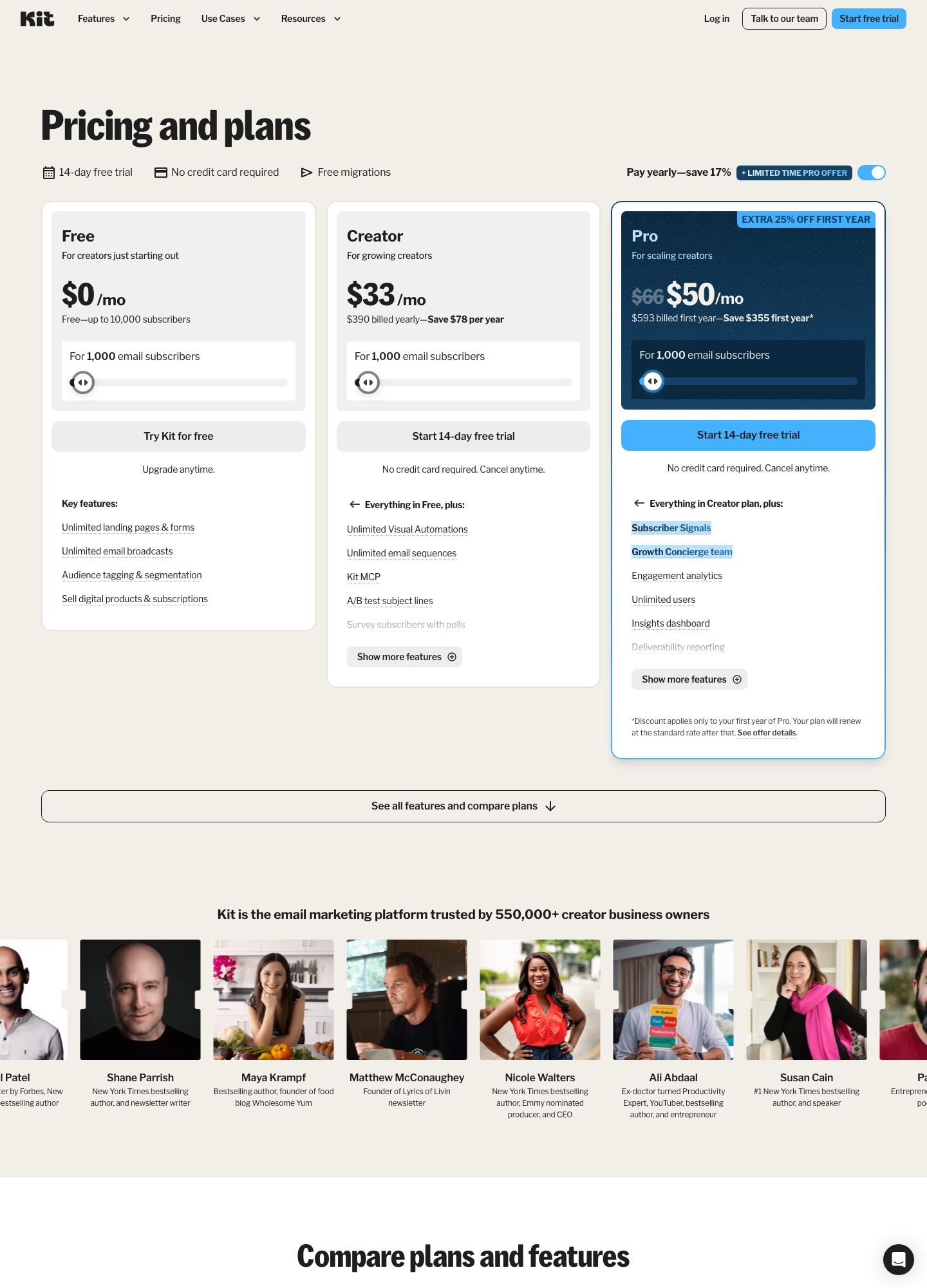
Kit's per-size figures are the monthly rates shown on its yearly-billing setting; beehiiv's price is also shown with yearly billing, and ActiveCampaign bills annually. Sources: Kit, beehiiv, Mailchimp, Brevo, ActiveCampaign and Drip.
Kit shows the pattern most clearly in the screenshot above: the Free column lists unlimited email broadcasts, while unlimited Visual Automations and email sequences are the first line under Creator. Brevo is the exception, because it includes automation in its free plan and rations the volume instead, with a 300-a-day cap.
Worked example: a 5,000-subscriber creator who wants one weekly issue and a welcome drip
The weekly issue is a blast; the welcome series for each new subscriber is a drip. Here is what the two jobs cost on three of the plans above, using the list prices on the pricing pages:
| Setup | Blast only | Blast and drip | Yearly cost of the drip |
|---|---|---|---|
| Kit at 5,000 subscribers | $0 on Free (limit is 10,000) | $75/month on Creator | $75 × 12 = $900 |
| beehiiv at 5,000 subscribers | Free tier stops at 2,500, so a paid plan is needed | $49/month on Lite | $49 × 12 = $588 |
| Kit at 10,000 subscribers | $0 on Free | $116/month on Creator | $116 × 12 = $1,392 |
Two conclusions follow. For a list under 10,000 whose only job is the weekly issue, Kit's free plan is the cheapest answer among the tools in this table, and a drip is something you can add later. For the same creator who needs the welcome series from day one, the comparison flips to beehiiv at 5,000 subscribers, where the paid plan that includes automation costs $26 a month less than Kit's, or $312 a year ($900 minus $588). The price gap does not tell you which tool is nicer to use; run the same four-email welcome sequence through a trial of each before you pay.
Counting sends: a blast uses far more email than the drip behind it
People expect the drip to be the heavy part of a program because it is more complicated, but the arithmetic usually says otherwise. Take a 10,000-person list with a weekly blast (52 sends a year, about 43,300 emails a month) and 400 new subscribers a month receiving a four-email welcome drip (1,600 emails a month). The drip is about 3.6% of the volume. That matters for plan limits, which are usually written in blast terms:
- Brevo Free sends 300 emails a day, so a single 10,000-person blast would take about 34 days (10,000 ÷ 300) to go out. A blast to a large list needs a paid plan with no daily limit; Brevo's Starter plan lists none.
- Mailchimp Free allows 500 sends a month and 250 a day on a list of at most 250 contacts. A weekly email to all 250 is about 1,083 sends a month (250 × 4.33), more than double the cap, so the free plan covers only two full-size issues a month (500 ÷ 250).
- ActiveCampaign Starter caps monthly sends at 10 times your contacts. At 1,000 contacts that is 10,000 sends, which covers a weekly blast (about 4,330) with room left over for drip emails, but not a daily email.
Questions readers ask about blasts and drips
Is a weekly newsletter a blast or a drip?
A blast, even when the platform sends it automatically every Tuesday, because the sender's calendar decides when it goes out. The welcome emails that new subscribers receive after signing up are the drip, because each person's signup date decides their schedule.
Can one campaign be both?
Yes, and the best launches are. Send the announcement to the whole list as a blast, then enroll everyone who clicked but did not buy in a short drip that answers the likeliest objection. Stop the drip as soon as the person purchases.
Do I need a paid plan to run both?
Usually, though where the paywall sits varies. Kit and beehiiv give away blasts and charge for automation; Brevo gives away automation for up to 2,000 contacts and limits daily volume; ActiveCampaign and Drip have no free plan at all. Check the table above against the size of list you will have six months from now.
What should end a drip early?
Any event that makes the next message pointless: a purchase, a reply, an unsubscribe, or a support complaint. Write the exit rule before the first message, then test it with a dummy contact. Most embarrassing sequences are missing exit rules, not missing emails.