Resend alternatives: where to send broadcasts and app email instead
Resend Pro is $35 at 100,000 emails and its marketing tab is $80 at 10,000 contacts. Eight alternatives for people leaving over the meter or plan limits.
Short answer
Most people who leave Resend are not leaving over deliverability. They hit a limit (the Free plan's 100 emails a day, three domains) or they dislike one of its two meters: emails sent on the transactional tab, contacts stored on the marketing tab. My pick for the common case, a developer who only wants cheaper sending, is Amazon SES. At $0.16 per 1,000 emails, 100,000 emails come to $16 a month (100 x $0.16). The Resend Pro slider lists $35 at the same volume. If you want to stay on a managed API and keep message streams separate, take Postmark. If your problem is the per-contact marketing bill, read the marketing table first, because at 10,000 contacts Resend is not the expensive one.
Why people leave Resend
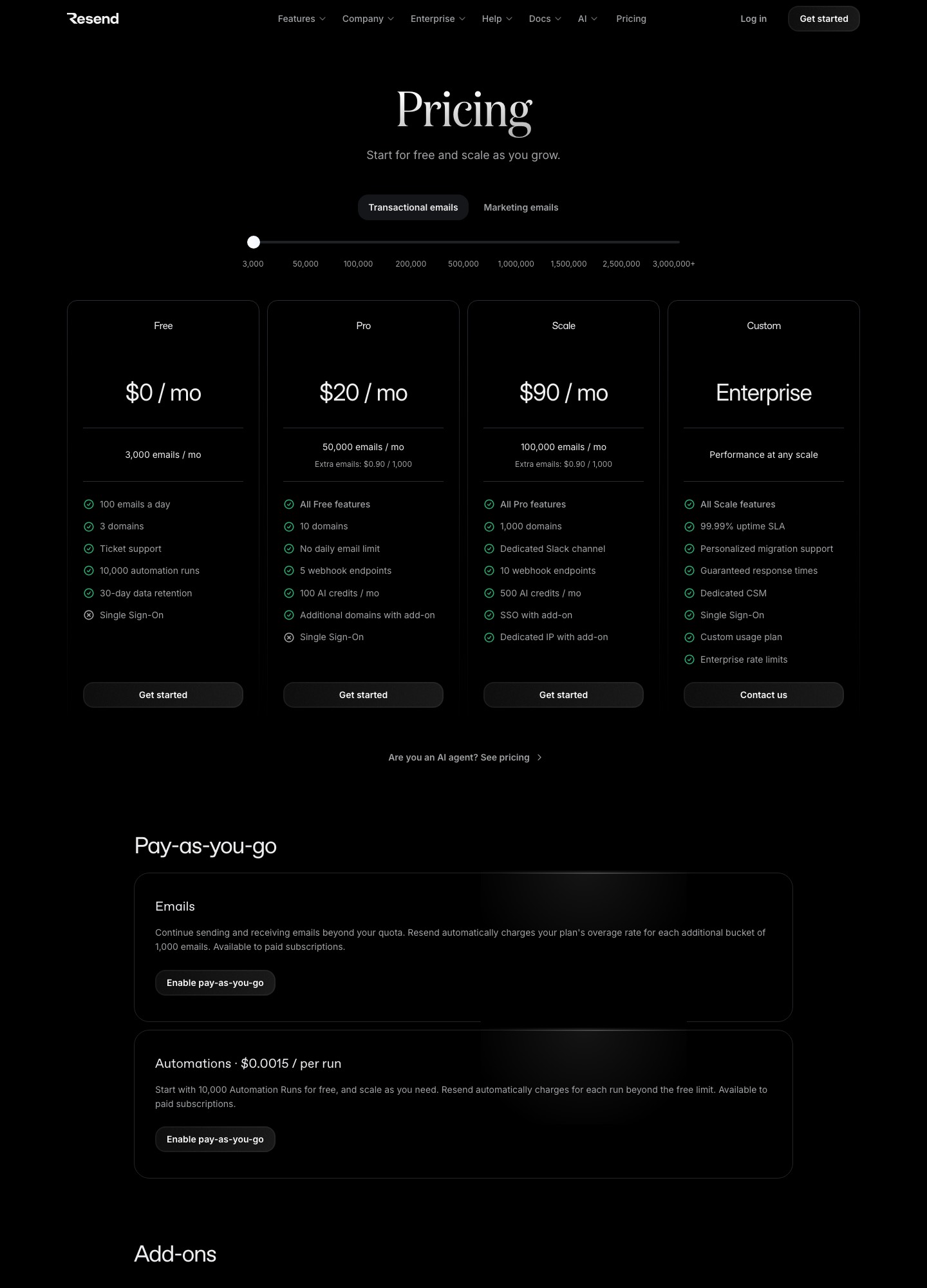
Resend's pricing page sells two different products with two different units. On the transactional tab the unit is emails: Free is 3,000 a month with a cap of 100 a day and 3 domains, Pro is $20 for 50,000 and $35 for 100,000, and Scale is $90 for 100,000, $160 for 200,000, $350 for 500,000 and $650 for 1,000,000. On the marketing tab the unit is contacts: free at 1,000 contacts with unlimited broadcast sending, 10,000 automation runs and 3 segments, then Pro at $40 for 5,000 contacts, $80 for 10,000, $180 for 25,000, $250 for 50,000 and $450 for 100,000.
That structure produces four recognisable reasons to look around. The first is the daily cap: a launch announcement to 4,000 people cannot go out in one afternoon on the Free plan, because 100 a day means 40 days. The second is the price jump between Pro and Scale: the pricing page shows Pro holding at $35 for 100,000 emails while Scale starts at $90 for the same 100,000, so the extra $55 a month is buying Scale's features (1,000 domains and a dedicated Slack channel according to the page), not capacity. The third is the add-on list: 100 extra domains cost $20 a month, a dedicated IP is $30 a month and is offered only to customers sending more than 3,000 emails a day on Scale, and single sign-on is $150 a month. The fourth is the contact meter, which charges for people on the list whether or not you mailed them this month. Automations are also metered: the page lists $0.0015 per run beyond what a plan includes.
None of this makes Resend a bad product. It is a reason to ask which job you are paying it for. A password reset, a receipt and a monthly newsletter have different cost shapes, and the right alternative depends on which one is driving your invoice. Our guide to transactional versus marketing email explains why mixing them on one sending reputation is worth thinking about before you move anything.
Quick comparison
| Alternative | Best if you | Billing unit | Price at two sizes | Free plan |
|---|---|---|---|---|
| Amazon SES | want the lowest per-email cost and can wire it yourself | Emails sent | $16 at 100,000; $80 at 500,000 | Free plan for 6 months, up to $200 credits for new AWS customers |
| Postmark | want a managed API with separated streams | Emails, slider stops | $55 at 50,000; $115 at 125,000 (Basic) | 100 emails a month |
| Mailgun | need longer logs, inbound routing or an EU region | Emails, plan tiers | $35 at 50,000; $75 at 100,000 (Foundation) | 100 emails a day |
| Mailtrap | want Resend's volume steps at a similar or lower price | Emails, plan tiers | $20 at 50,000; $30 at 100,000 (Basic) | 4,000 a month, 150 a day |
| Loops | run a SaaS and want lifecycle email by subscriber | Subscribers | $99 at 9,998; $198 at 24,339 | 1,000 newest contacts, 4,000 sends in 30 days |
| MailerLite | hand newsletters to a non-developer | Subscribers | Comfort $89 at 10,000; $179 at 25,000 | 250 subscribers, 2,500 emails |
| Brevo | want one account for campaigns and application mail | Emails per month | Starter $9 and Standard $18, from 5,000 emails | 300 emails a day |
| Plunk | want a flat per-email rate, or to self-host | Emails sent | $40 at 40,000; $100 at 100,000 | 1,000 emails a month |
1. Amazon SES: the cheapest meter, with the most assembly
Amazon SES's pricing page lists Essentials at $0.16 per 1,000 emails, and its own worked example shows 250,000 emails costing $40. Run the arithmetic at the stops of a typical transactional slider: 50,000 emails are $8 (50 x $0.16), 100,000 are $16, 500,000 are $80 and 1,000,000 are $160. The Resend slider reads $20, $35, $350 and $650 at those four volumes. The gap is $19 a month at 100,000 and $270 a month at 500,000, which is $3,240 a year, and it is the reason SES is the default answer for engineers who only need delivery.
What you give up is everything around the send. The SES pricing page lists sending, not an audience screen or a broadcast composer, so a marketing list means building your own or pairing SES with a front end that sends through it. You also own bounce and complaint handling, suppression sync and the webhook plumbing. The SES page does list deliverability monitoring, inbound processing through Mail Manager and dedicated IP add-ons: the standard dedicated IP is $24.95 a month per IP. The managed Pro and Enterprise levels add fixed fees of $105 and $500 per account per region, at $0.22 and $0.23 per 1,000 emails. Resend's own dedicated IP add-on, for comparison, is $30 a month.
Choose SES if your volume is high, your application already sits on AWS and nobody on the team minds IAM policies. Stay on Resend if the draw was a one-line API, nicer logs and a composer for non-developers. Migration is mostly code: swap the SDK call, verify the domain and DKIM in SES, point event notifications at your own endpoint, and keep Resend running on a second DKIM selector until the first week of mail has landed. New AWS customers get a free plan for 6 months with up to $200 in credits, which pays for a long pilot.
2. Postmark: managed, separated, and not the cheap option
Postmark's pricing page works by slider stops. Basic, Pro and Platform are $15, $16.50 and $18 at 10,000 emails; $55, $60.50 and $66 at 50,000; $115, $126.50 and $138 at 125,000; and $245, $269.50 and $294 at 300,000. Next to Resend Pro's $20 for 50,000 emails, Postmark Basic's $55 is $35 more each month, $420 a year. You are not buying volume with that money. The page lists 45 days of data retention by default and up to 365 days on the higher plans, inbound email processing on those plans, and a dedicated IP from $50 a month per IP, offered to customers sending 300,000 emails a month or more on Pro or higher.
The free plan is the thing Resend leavers notice first: 100 emails a month with no overages allowed, against 3,000 emails on Resend Free. Postmark is a switch for a team whose problem is debugging and separation: you want the receipt stream and the broadcast stream in one account without sharing an IP range, and a support person who can still find last month's message. It is a poor switch if the complaint is the bill, because the cheapest Postmark route to 100,000 emails is not even a slider stop (the page jumps from 50,000 to 125,000). Our Resend vs Postmark comparison covers the API and webhook differences in detail.
Migration effort is moderate. Create servers and streams, authenticate the domain, port templates by hand, move webhook handlers (Postmark has its own event payloads), and import your suppression list before the first send. Marketing automations on the Resend side have no counterpart you can import and must be rebuilt in another tool.
3. Mailgun: the log retention and EU region play
Mailgun's pricing page lists a Free plan of 100 emails a day, Basic at $15 for 10,000 a month, Foundation at $35 for 50,000 and Scale at $90 for 100,000, with slider readouts of $75 for Foundation at 100,000 emails, $215 for Scale at 250,000 and $400 for Scale at 500,000. Foundation and Scale come with a free first month. Against Resend that is a poorer deal on price: Resend Scale lists $350 at 500,000 emails where Mailgun Scale lists $400.
The reasons to pay it are narrower. Log retention is 1 day on Free and Basic, 5 days on Foundation and 30 days on Scale, and the page lists inbound routing, email validation (5,000 validations on Scale), and the option to send through the US or the EU from a single account. One dedicated IP is included with Foundation at 100,000, Growth and Scale, and an extra IP is $59 a month. On the Resend side, a dedicated IP is gated to customers above 3,000 emails a day on Scale. The Free plan also allows only one custom sending domain, so an agency that used Resend's three free domains cannot carry them over without paying.
Pick Mailgun when your inbound mail matters as much as outbound, or when you need an EU sending region. Skip it when price is the trigger: the overage rates run from $1.80 per 1,000 on Basic to $1.10 on Scale. Moving across means a new sending domain or DKIM key, routes for inbound if you use them, and a webhook rewrite. The SendGrid vs Mailgun comparison shows how Mailgun's plan ladder reads next to another API-first vendor.
4. Mailtrap: Resend's price steps, a little cheaper
Mailtrap's billing documentation lists Free at 4,000 emails a month with a 150-a-day limit, Basic at $15 for 10,000, $20 for 50,000 and $30 for 100,000, and Business at $85 for 100,000, $200 for 250,000 and $300 for 500,000. The first thing to notice at 50,000 emails is a tie: Mailtrap Basic is $20 and Resend Pro is $20. From there Mailtrap pulls ahead. At 100,000 emails its Basic plan is $30, and Resend Pro lists $35, so the saving is $60 a year ($5 x 12). At 500,000 emails Mailtrap Business is $300, and Resend Scale lists $350, a saving of $600 a year ($50 x 12).
The free plan helps with the specific Resend wall. Its 4,000 monthly emails and 150 a day mean a 4,000-person announcement takes about 27 days instead of 40, which is still too slow, so the free plan is for testing and low-volume app mail, not launches. I did not read Mailtrap's marketing or automation features, so treat it as a sending-API replacement. If you used Resend broadcasts, you will need another home for them.
Mailtrap suits a team that likes Resend's API-first feel and wants a modest saving without re-architecting. It does not suit anyone who wants a different meter. Migration is DNS plus code: add the sending domain, swap the API key or SMTP credentials, rebuild webhooks, and import suppressions.
5. Loops: the marketing tab, priced by subscriber
Loops' pricing page offers a free plan for the 1,000 newest contacts with up to 4,000 sends in any rolling 30 days and a "Powered by Loops" footer. The paid Growing Audience Plan was read at $48 for 4,788 subscribers, $99 for 9,998, $198 for 24,339 and $249 for 49,989, with transactional sending included and no per-seat charge.
Set those against Resend's marketing tab and the story is unexpected. Resend's tab reads $80 for 10,000 contacts, $180 for 25,000 and $250 for 50,000. Loops read $99 near 10,000 subscribers, $198 near 25,000 and $249 near 50,000. Loops is roughly level at the top of that range and dearer in the middle, so nobody should move for price. People move for the product: Loops positions itself around SaaS lifecycle email, and every plan includes all features, while Resend's broadcast side is closer to a sender with a composer. Loops also counts only subscribed contacts, so a list with many unsubscribes pays less.
Choose Loops if you are a SaaS company that wants lifecycle email beside broadcasts and does not want to bill per seat. Stay on Resend if your volume is application mail and the marketing tab is a side job. Migration means exporting contacts and properties, recreating segments and automations by hand, and keeping your transactional sends where they are until the new tool is proven. The Loops vs Resend comparison sets the two side by side, and Loops alternatives shows who leaves in the other direction.
6. MailerLite: for the person who is not a developer
MailerLite's pricing page prices by subscriber. The free plan covers 250 subscribers and 2,500 emails a month with 2 seats. Monthly-billed Comfort is $19 at 1,000 subscribers, $49 at 5,000, $89 at 10,000 and $179 at 25,000; Power is $39, $69, $129 and $239 at the same stops. Resend's marketing tab reads $40, $80 and $180 at 5,000, 10,000 and 25,000 contacts. Comfort therefore costs $9 more a month at 5,000 and 10,000 and $1 less at 25,000.
So MailerLite is not a savings move either. It is a hand-off move: a marketer who finds Resend's contact tab too developer-flavoured gets a visual newsletter builder, forms and automation in a product designed for them. Comfort gives 10 times the subscriber-tier ceiling in monthly emails, so the 10,000 tier allows 100,000 a month, and Power is unlimited. The pricing page also says its data storage center is in the European Union and carries an ISO 27001 certificate, which matters if an EU customer asks.
Choose it when a non-engineer owns the newsletter and engineering keeps Resend or SES for application mail. Do not choose it for password resets: it is a campaign tool and your transactional stream should live elsewhere. Moving needs a CSV export of contacts, an import into groups, a rebuilt signup form and a fresh look at unsubscribe handling.
7. Brevo: one account, a different meter again
Brevo's pricing page sets its price from the email volume you select rather than from contacts. The Free plan sends 300 emails a day and stores up to 100,000 contacts, with 2,000 contacts in marketing automation. Starter is $9 a month and Standard is $18, both from 5,000 emails a month; Starter has no daily sending limit, and Standard adds automation, A/B testing and advanced reports. Professional is $499 and starts at 150,000 monthly sends.
That is the pricing shape many Resend marketing users want: a large contact list that does not inflate the bill, with the invoice following how often you send. A 20,000-contact list mailed twice a month is 40,000 emails, and Brevo prices that volume while Resend's marketing tab prices the 20,000 contacts, a stop that sits between its listed $80 at 10,000 and $180 at 25,000. I did not read Brevo's price at 40,000 emails, so use its selector for that figure. Free-plan arithmetic is easy: 300 a day is up to 9,000 in 30 days, three times Resend Free's monthly 3,000 and three times its 100-a-day cap.
The compromises are the add-ons and plan gating: the pricing page shows removing the Brevo logo as an add-on at $10.80 per month, and Brevo's help article puts each extra marketing seat on Standard at $9 a month. Pick Brevo when the same account has to mail a newsletter and send order notices, and when the list is large but sparse in activity. Migration is contacts plus attributes, templates rebuilt in its editor, domain authentication, and a decision about which of your Resend sends move first.
8. Plunk: a flat rate and an open-source escape hatch
Plunk's pricing page has two plans: free at 1,000 emails a month with Plunk branding, and a paid plan at $0.001 per email, which is $1 per 1,000, with unlimited contacts, no branding and a monthly spend cap. Everything in the free plan is in both: transactional email, workflow automation, campaign broadcasts and custom domains. The code is AGPL-3.0 and can be self-hosted.
The arithmetic splits the usage cleanly. A 10,000-contact list mailed 4 times a month is 40,000 emails, or $40 at Plunk's rate. Resend's marketing tab lists $80 for 10,000 contacts, double that. At 100,000 emails a month Plunk's rate gives $100. Resend's transactional tab lists $35 for the same volume, so Plunk is nearly three times dearer there. So Plunk is for a large, quiet list and unpredictable volume, not for high-frequency app mail, and a spend cap protects you from a runaway workflow.
Self-hosting makes it a possible exit if you want to own the sending stack, at the cost of running it. Hosted or not, migration means exporting contacts, rebuilding workflows, and re-pointing domain records.
Cost at three sizes
| Emails per month | Resend | Amazon SES | Mailtrap | Mailgun | Plunk |
|---|---|---|---|---|---|
| 50,000 | Pro $20 | $8 | Basic $20 | Foundation $35 | $50 |
| 100,000 | Pro $35 (Scale $90) | $16 | Basic $30 (Business $85) | Foundation $75 (Scale $90) | $100 |
| 500,000 | Scale $350 | $80 | Business $300 | Scale $400 | $500 |
The SES and Plunk cells are emails multiplied by the per-1,000 rate on each vendor's page; the other cells are plan prices as listed. Postmark is left out because 100,000 and 500,000 are not slider stops (its stops are 10,000, 50,000, 125,000 and 300,000, with Basic at $55 for 50,000). For contact-priced marketing see the stops above: Resend marketing is $40, $80, $180 and $250 at 5,000, 10,000, 25,000 and 50,000 contacts.
Switching from Resend
Export what you can first. Contacts and their properties leave as a CSV; broadcasts, templates and automations do not move, so budget time to rebuild every automation and to count its runs, since Resend's pricing page lists automations at $0.0015 per run and its free marketing plan includes 10,000 runs. Segments are the likeliest casualty: the Free plan caps them at 3, and anything you built on the paid plan will need to be recreated as filters or tags in the new product.
Consent comes before contacts. Export the unsubscribed and bounced addresses separately and import them as suppressions, not as ordinary contacts, so the first send from the new tool cannot mail people who left. Keep a record of when and how each address opted in, because the new vendor will ask and a regulator can too. Our email broadcast guide and bulk email sending guide list the consent and list-hygiene steps.
Run the pilot in parallel. Add the new vendor's DKIM record alongside Resend's rather than replacing it, send transactional mail through the new route for a week, and mail a small slice of your list, perhaps 500 contacts, before moving a full broadcast. Watch bounces, complaints and unsubscribes in both dashboards, then move the remaining stream and retire the old keys. If you are weighing infrastructure choices more broadly, how to choose an email tool and the deliverability guide cover warm-up and authentication. Developers can also see our developer shortlist and the tools directory, and the full set of alternatives pages covers other vendors.
Which one to choose
- Choose Amazon SES if volume is the problem and your team can build the surrounding pieces: $16 at 100,000 emails.
- Choose Postmark if separated streams, 45-day logs and a managed API matter more than price.
- Choose Mailgun if inbound routing, 30-day logs on Scale or an EU region decide it.
- Choose Mailtrap if you want volume steps shaped like Resend's for a little less at 100,000 and 500,000 emails.
- Choose Loops if you are a SaaS team wanting lifecycle email by subscriber.
- Choose MailerLite if a marketer, not an engineer, will run newsletters.
- Choose Brevo if a big, quiet list is making per-contact billing hurt.
- Choose Plunk if you want a flat $1 per 1,000 or a self-hosted option.
FAQ
Is Resend only for transactional email?
No. Its pricing page has a marketing tab with contact-based plans: free at 1,000 contacts with unlimited broadcasts and 10,000 automation runs, then $40 at 5,000 contacts. People who leave usually do so because of the contact meter, the Free plan's 100-a-day cap, or add-on prices, not because marketing is missing.
What is the cheapest Resend alternative at 100,000 emails a month?
On list prices, Amazon SES: 100,000 emails at $0.16 per 1,000 is $16. Mailtrap Basic is $30. Mailgun Foundation is $75. Resend Pro is $35. The SES figure excludes the engineering time to build bounce handling and any sending interface.
Can I keep Resend for app email and move only the newsletter?
Yes, and it is often the cheapest fix. A newsletter subscriber list of 10,000 costs $80 on Resend's marketing tab, while a per-email tool such as Plunk charges $1 per 1,000 emails sent, or $40 for four sends. Keep a separate sending subdomain for each stream so a complaint on the newsletter does not touch your receipts.
Do my Resend automations and segments transfer?
No. Contacts export as a CSV, but automations, segments and templates are rebuilt by hand in the new tool. Plan the rebuild before cancelling: Resend's marketing automations are counted by run, and a new vendor may count enrolments or emails instead.