Mailchimp alternatives for broadcast email, priced at 500, 5,000 and 10,000 contacts
Eight Mailchimp alternatives priced at 500, 5,000 and 10,000 contacts: MailerLite is $49 at 5,000 against Mailchimp $100. Free plans, limits and migration steps.
Short answer
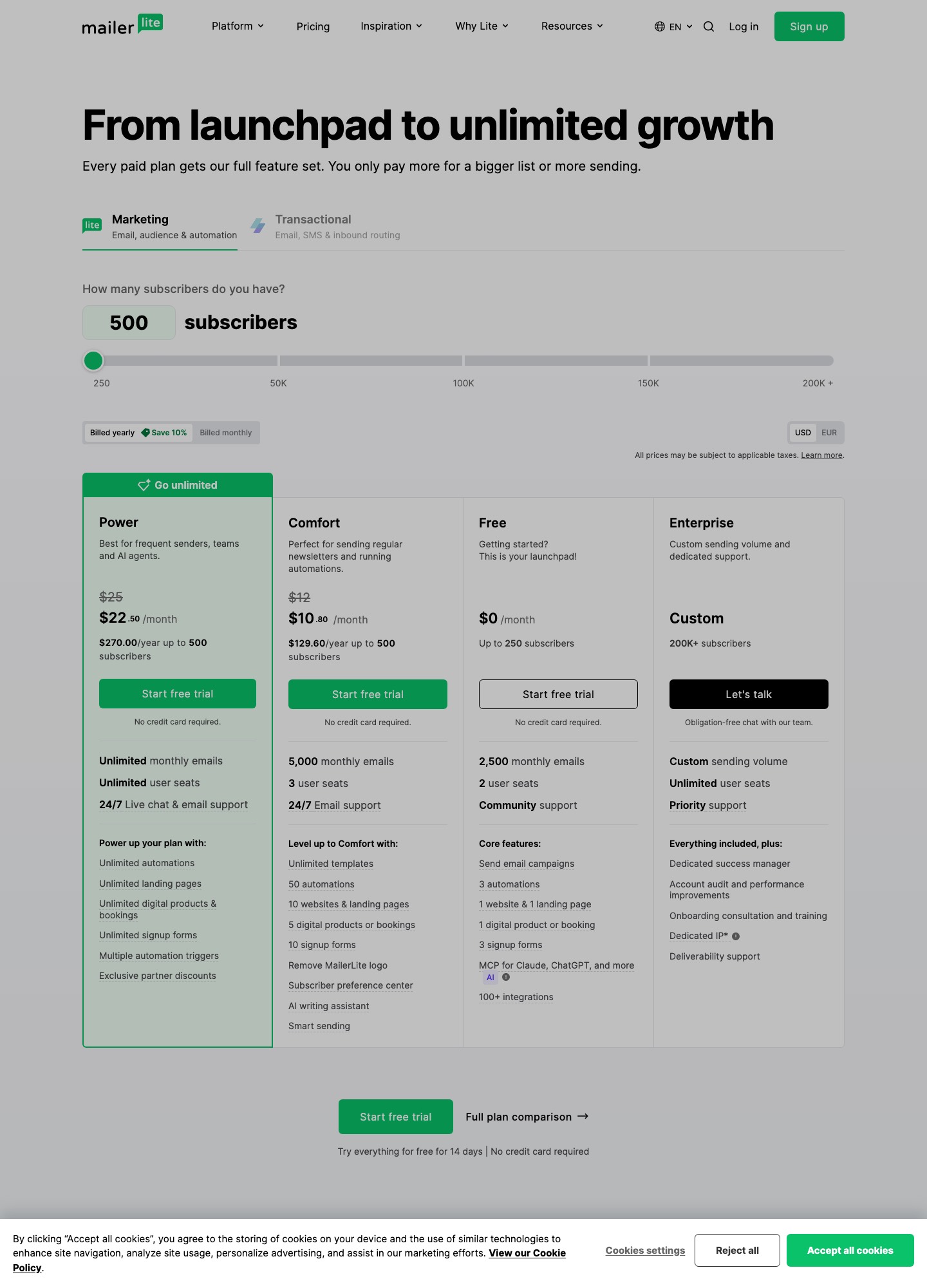
MailerLite is the best first move for most people leaving Mailchimp. It also bills by subscribers, but its Comfort plan reads $49 at 5,000 subscribers and $89 at 10,000, while Mailchimp's marketing pricing page lists Standard at $100 for the 2,501-5,000 contact band and $135 for 5,001-10,000. If you mail a big list only once or twice a month, Brevo is the better pick because it prices by emails sent rather than by contacts held. The other six options below fit narrower reasons for leaving.
Why people leave Mailchimp
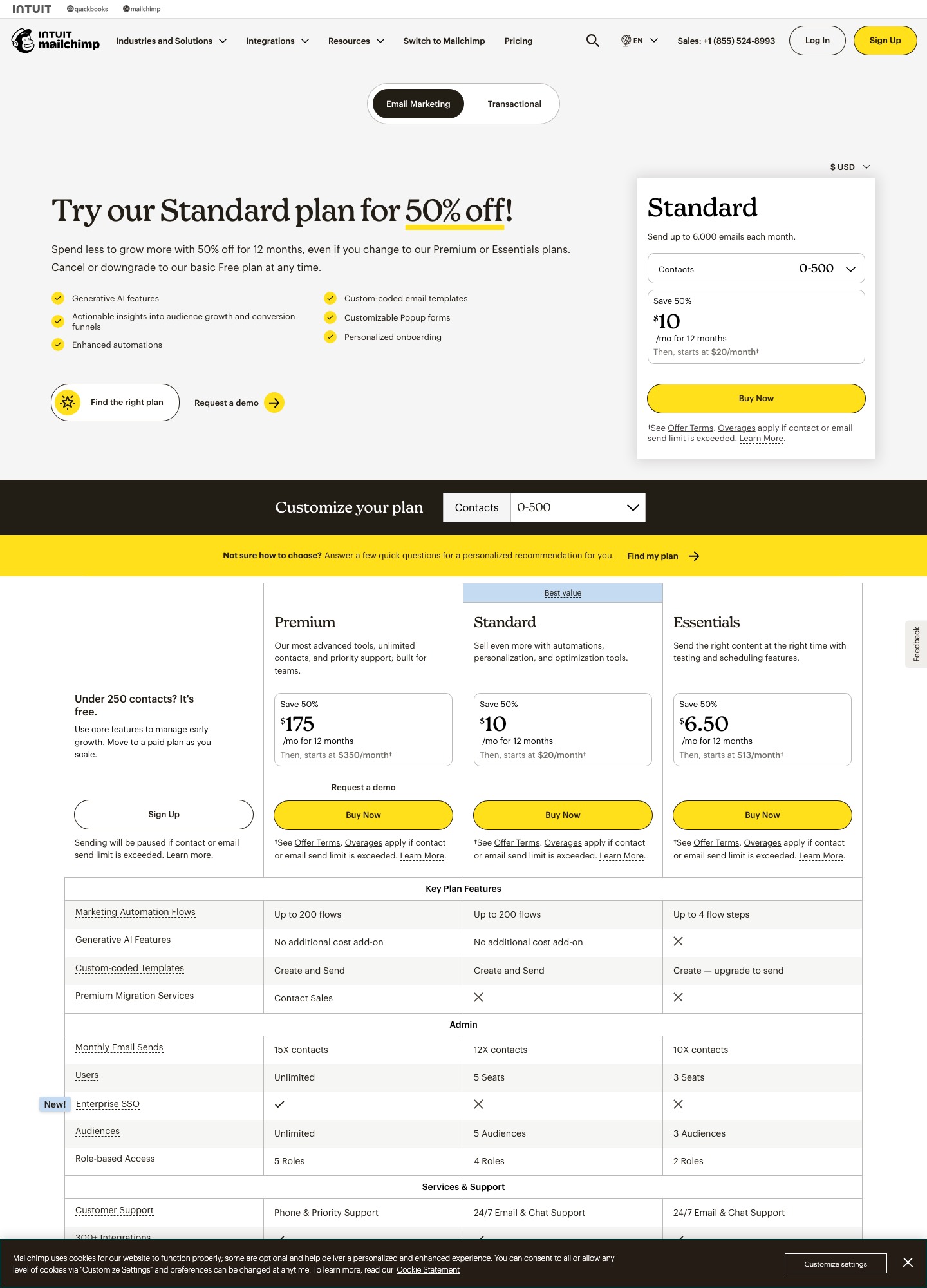
The trigger is almost always the bill, and the bill follows the contact count. Standard starts at $20 a month for the default 500-contact selector, then the page jumps to $100 in the 2,501-5,000 band, $135 for 5,001-10,000, $230 for 10,001-15,000 and $310 for 20,001-25,000. Going from the 500-contact price to the next listed band is a fivefold step ($20 to $100). Mailchimp's captured page does not show a Standard price at exactly 1,500 or 2,500 contacts, so this page does not state one either.
The second trigger is the discount that ends. Mailchimp displays first-12-months offers: $17 for Standard at 500 contacts, $50 at 2,501-5,000, $67.50 at 5,001-10,000, $115 at 10,001-15,000 and $155 at 20,001-25,000. These are offers, not list prices. When month 13 arrives, a 5,000-contact list goes from $50 to $100, which is $600 more over a year ($50 x 12). The 10,001-15,000 band adds $1,380 a year ($115 x 12).
The third is the free plan. It covers 250 contacts and 500 sends a month with a 250-a-day ceiling, one audience and one seat, so a full 250-person list can be mailed just twice a month. The fourth is plan gating: Essentials ($13 at 500 contacts) allows 3 seats and sends 10 times your contact count, and custom-coded templates can be created on it but you must upgrade to send them. Standard allows 5 seats and 12 times contacts. Premium starts at $350 a month with unlimited users and 15 times contacts.
Quick comparison table
| Tool | Best if you | Billing unit | Price at 5,000 and 10,000 | Free plan |
|---|---|---|---|---|
| Mailchimp (baseline) | Stay put for integrations | Contacts | Standard $100 (2,501-5,000), $135 (5,001-10,000) | 250 contacts, 500 sends a month |
| MailerLite | Want the same model for less | Subscribers | Comfort $49 and $89; Power $69 and $129 | 250 subscribers, 2,500 emails a month |
| Brevo | Mail a large list rarely | Emails sent | Starter from $9 and Standard from $18 at 5,000 emails a month | 300 sends a day |
| Kit | Sell to your audience | Subscribers | Creator $75 and $116 | Up to 10,000 subscribers |
| Mailjet | Have a huge, quiet list | Emails sent | Essential $19 at 15,000 emails, $40 at 50,000 | 6,000 emails a month, 200 a day |
| Campaign Monitor | Need polished agency output | Contacts | Lite $75 and $117; Essentials $117 and $182 | None (30-day trial) |
| Constant Contact | Want tiers like Mailchimp's | Contacts | Lite from $12, Standard from $35, Premium from $80 | None (free trial) |
| ActiveCampaign | Need real automation | Contacts | Starter $79 and $149 (billed annually) | None (trial) |
| Elastic Email | Have a small list and an API | Contacts, with email caps | Starter $29 up to 2,500 contacts | 1,000 contacts, 3,000 emails a month |
Prices are what each vendor's pricing page displayed on 7 October 2026. Where a vendor's page does not show a figure at the list size above, the cell says so or stops at the entry price. Campaign Monitor figures use its monthly toggle; ActiveCampaign's are the annual-billing readout; Kit's selector may show yearly-billing rates, since its first price reads $33 a month with $390 billed yearly.
1. MailerLite: $49 at 5,000 subscribers against $100
Choose MailerLite if your Mailchimp use is newsletters, forms and a welcome series, and the bill is the only real complaint. Comfort at 5,000 subscribers is $49 a month, which is $51 below Mailchimp's $100 band and $612 over a year. At 10,000 it is $89 against $135, a $46 gap or $552 a year. Power ($69 at 5,000, $129 at 10,000) adds unlimited monthly emails, but at 10,000 it sits only $6 under Mailchimp's $135, so take Comfort unless you really send more than ten times your subscriber ceiling.
On the free plan MailerLite gives 250 subscribers and 2,500 monthly emails with 2 seats, which is five times Mailchimp's 500 sends for the same 250 people. What you lose: Mailchimp lists SMS and transactional email, while MailerLite does not do transactional mail (that is MailerSend's job). Mailchimp's pricing page names Shopify, WooCommerce, Canva, Zapier, Square, Wix, Salesforce and WordPress among its integrations, so list the connections you depend on before you move. Export your audience as CSV, import it, and rebuild automations by hand. Read the head-to-head in MailerLite vs Mailchimp.
2. Brevo: pay for emails sent, not contacts stored
Take a 5,000-contact list mailed once a month. That is 5,000 emails, and Brevo's pricing page starts Starter at $9 and Standard at $18 for exactly that volume. Mailchimp's band for the same list is $100, so the gap is $91 a month on Starter ($1,092 a year) or $82 on Standard ($984). The page does not list a price at 20,000 emails, which is what weekly sending to the same list would need, so the saving shrinks by an amount this page cannot quantify; Brevo's own volume selector sets that number.
Brevo's Free plan allows 300 sends a day while storing up to 100,000 contacts. The daily cap bites: one campaign to 5,000 people takes about 17 days at 300 a day (5,000 divided by 300). Starter has no daily limit. Standard adds automation, A/B testing and advanced reports. The sticker that reads "Sent by Brevo" costs extra to remove: Brevo's pricing page lists "Remove Brevo branding" at $10.80 a month, while its help article gives the Remove Brevo logo add-on as $9 a month. Brevo also sends transactional email from the same account, which Mailchimp leavers with order confirmations to send will notice.
3. Kit: free to 10,000 subscribers if you only broadcast
Kit's free plan covers up to 10,000 subscribers with unlimited broadcasts, forms, landing pages, tagging and segmentation. A 10,000-contact list that Mailchimp prices at $135 a month can therefore cost nothing on Kit if you never need automations. Visual Automations and sequences start on Creator, which reads $116 at 10,000 subscribers ($19 under Mailchimp's band) and $166 at 25,000, against Mailchimp's $310 for 20,001-25,000. Pro reads $158 at 10,000 and $233 at 25,000.
Kit suits people who sell digital products or subscriptions to their list, since selling them is part of the product. Kit's pricing page advertises a 14-day trial and free migrations, so the subscriber import is handled for you, while sequences still have to be rebuilt in its Visual Automations editor.
4. Mailjet: unlimited contacts at $19 for 15,000 emails
Mailjet's Essential plan is $19 a month for 15,000 emails with unlimited contacts, so list size stops driving the bill. A 12,000-contact list mailed once a month needs 12,000 emails and fits Essential at $19, where Mailchimp's 10,001-15,000 band is $230 (offer $115): a $211 difference per month, $2,532 over a year. Mail the same list weekly and you reach 48,000 emails (12,000 x 4), which Mailjet's selector prices at $40 for Essential at 50,000 emails. Premium runs $29 at 15,000 emails, $59 at 50,000 and $112 at 100,000, and is the tier that lists no daily sending limit.
The free plan is 6,000 emails a month, capped at 200 a day, with 1,000 contacts. Starter at $9 allows 8,000 emails and 2,000 contacts. Mailjet also offers an email API and SMTP relay, so product notifications can share the account. The trade is the opposite of Mailchimp's: you pay for the email volume you send, so mailing more often moves you up Mailjet's volume stops (12,000 emails read $19, 48,000 read $40) instead of staying flat the way a contact-based band does.
5. Campaign Monitor: polish, not savings
Campaign Monitor is the one alternative here that is mostly not cheaper. On its monthly toggle Lite is $75 at 5,000 contacts and $117 at 10,000, but Lite sends five times your subscribers each month (25,000 emails at 5,000 contacts). Essentials, which has unlimited sends, is $117 and $182, above Mailchimp's $100 and $135. Premier is $203 and $300.
Reasons to switch anyway: drip campaigns, custom-coded templates and inbox previews are on its feature list, as are 250+ integrations, and its trial runs 30 days with 500 contacts and a 500-email limit. Compare it directly in Campaign Monitor vs Mailchimp. Choose it for the template and testing tools, not the invoice.
6. Constant Contact: the same tier ladder with different ceilings
Constant Contact's pricing page shows Lite from $12, Standard from $35 and Premium from $80 a month ($10.20, $29.75 and $68 billed annually), and says the exact price depends on your contacts. The page does not give a price at 5,000 or 10,000 contacts, so use the selector before deciding. Its monthly send ceilings are 10, 12 and 24 times your contact count; Mailchimp's are 10, 12 and 15.
The interesting gap is at the top: Mailchimp's Premium starts at $350, while Constant Contact's Premium starts at $80 and includes advanced automation, segmentation and 500 SMS a month with unlimited users. At the bottom the order flips, since Standard from $35 costs more than Mailchimp's $20 Standard at 500 contacts. There is no free plan, only a free trial without a card. See Mailchimp vs Constant Contact.
7. ActiveCampaign: for leavers who want automation, not a cheaper bill
ActiveCampaign Starter is $15 at 1,000 contacts, $39 at 2,500, $79 at 5,000, $149 at 10,000, $231 at 15,000 and $391 at 25,000, billed annually, and is not offered above 25,000. Against Mailchimp it wins at 5,000 ($79 against $100) and loses at 10,000 ($149 against $135), and the billing basis differs (annual against Mailchimp's monthly). Starter caps automations at 5 actions each; Plus ($145 at 5,000, $189 at 10,000) adds standard segmentation and landing pages.
Move to ActiveCampaign if Mailchimp's journeys have become tangled and you want conditional content and a CRM alongside your email. Budget time to rebuild every automation, since none is imported.
8. Elastic Email: four times the free contacts
Elastic Email's free plan holds up to 1,000 contacts and 3,000 emails a month, with a limit of 100 emails a day. Compare Mailchimp's 250 contacts and 500 sends: four times the contacts, six times the sends. Starter is $29 a month for up to 2,500 contacts and 37,500 emails; Pro is $49 with advanced automation and user management at the same limits. Mailchimp's own page jumps from the 500-contact price to a $100 band beginning at 2,501 contacts, so a list of about 2,500 is the sweet spot here.
Elastic Email also sells an Email API plan ($19 for 50,000 emails, $49 on Pro), which helps if the same team sends application mail. The pages I read do not list prices above 2,500 contacts on the marketing plans, so larger lists need a quote from its pricing page.
What Mailchimp itself costs
For reference, Mailchimp's pricing page lists Essentials from $13, Standard from $20 and Premium from $350, with a 14-day Standard trial. Contacts determine the band; sends scale with it (up to 6,000 emails a month at the 500 stop, 60,000 for 2,501-5,000, 120,000 for 5,001-10,000 and 180,000 for 10,001-15,000).
Switching from Mailchimp
Start by exporting the audience, and export every status: subscribed, unsubscribed and cleaned (bounced) contacts. The unsubscribed and cleaned files are your suppression list. Import them into the new tool first and mark them suppressed, so nobody who opted out ever receives a mail from the new account. Keep the date and source of each opt-in column, because the new platform needs consent evidence too.
Open the exported CSV and look for your tags and segment memberships before importing; whatever is not a column in the file has to be recreated by hand in the new tool. Automations, templates, signup forms and reports do not move. Rebuild the welcome series and your two or three highest-traffic templates first, point the website forms at the new tool, and leave old Mailchimp campaign pages up for a month so archived links keep working.
Run a pilot before cutting over: send one real campaign to 10 percent of the list from the new tool, authenticate the sending domain (SPF and DKIM) beforehand, and compare bounces and unsubscribes with your last Mailchimp send. Keep the Mailchimp account until the second clean send from the new tool, so you can still compare numbers and re-export if something was missed. The email deliverability guide covers the DNS steps, and how to choose an email tool helps if two options tie.
Monthly cost at three list sizes
| Tool | 500 contacts | 5,000 contacts | 10,000 contacts |
|---|---|---|---|
| Mailchimp Standard | $20 ($17 first-year offer) | $100 ($50 offer) | $135 ($67.50 offer) |
| MailerLite Comfort | $12 ($10.80 annual) | $49 | $89 |
| Kit Creator | First stop read is 1,000 at $33 | $75 | $116 |
| Campaign Monitor Lite | $13 | $75 | $117 |
| ActiveCampaign Starter | First stop read is 1,000 at $15 | $79 | $149 |
| Brevo, one send a month | Starter from $9 at 5,000 emails a month; the page lists no price at other volumes in what this page holds | ||
Choose by reason for leaving
- The contact-based bill is the problem and your sends are regular: MailerLite.
- You have a large, quiet list: Brevo, or Mailjet if the list is past 10,000.
- You sell to your audience and mostly broadcast: Kit.
- Premium gating at $350 is why you are leaving: Constant Contact Premium from $80, or ActiveCampaign if automation is the real need.
- You hand-code templates and want inbox previews and drip campaigns: Campaign Monitor.
FAQ
Does Mailchimp charge by contacts or by sends?
By contacts. The price you pay is set by the contact band, and the monthly send allowance rises with that band: 12 times your contacts on Standard, 10 times on Essentials and 15 times on Premium. Brevo and Mailjet reverse this by pricing the emails you send.
Is Mailchimp's free plan enough for a small newsletter?
Only for a very small list. It allows 250 contacts and 500 sends a month, up to 250 a day, in one audience with one seat. A weekly newsletter to 125 people already uses the whole allowance.
What is the cheapest way to leave Mailchimp with a 10,000-contact list?
If you only broadcast, Kit's free plan covers up to 10,000 subscribers. If you need automations, MailerLite Comfort reads $89 at 10,000 against Mailchimp's $135. If you mail once or twice a month, Mailjet Essential at $19 for 15,000 emails is lower still.
Can I move my Mailchimp automations and templates?
Not as files. Contacts and their fields export as CSV; automations, templates and forms are rebuilt in the new tool. Rebuild the welcome series first and run a 10 percent pilot before moving everything.